static public void uploadFile(IInfoStore infoStore, String filename, String title, int parentId) throws SDKException { IInfoObjects infoObjects = infoStore.newInfoObjectCollection(); IInfoObject newInfoObject = infoObjects.add(CeKind.EXCEL); newInfoObject.setTitle(title); newInfoObject.getFiles().addFile(filename); newInfoObject.setParentID(parentId); infoStore.commit(infoObjects); }
Example of Token Generation
The following JSP page generates a token and logs on to the InfoView with the token.
The following file logonAuto.jsp can be placed into the folder:
[BOInstallationFolder]\Tomcat55\webapps\InfoViewApp
logonAuto.jsp
<%@ page language="java" contentType="text/html;charset=UTF-8"%> <%@ page import="com.crystaldecisions.sdk.exception.SDKException"%> <%@ page import="com.crystaldecisions.sdk.framework.CrystalEnterprise"%> <%@ page import="com.crystaldecisions.sdk.framework.IEnterpriseSession"%> <%@ page import="com.crystaldecisions.sdk.framework.ISessionMgr"%> <%@ page import="com.crystaldecisions.sdk.occa.security.ILogonTokenMgr"%> <% String url = "http://servername:8080"; IEnterpriseSession enterpriseSession = null; String token = ""; try { ISessionMgr sessionMgr = CrystalEnterprise.getSessionMgr(); enterpriseSession = sessionMgr.logon("Administrator", "", "localhost", "secEnterprise"); ILogonTokenMgr logonTokenMgr = enterpriseSession.getLogonTokenMgr(); token = logonTokenMgr.createLogonToken("", 60, 1); } catch (SDKException ex) { ex.printStackTrace(); } finally { if (enterpriseSession != null) enterpriseSession.logoff(); } %> <html> <head> <meta http-equiv="REFRESH" content="0;url=<%=url%>/InfoViewApp/logon/start.do?ivsLogonToken=<%=token%>"/> </head> <body> </body> </html>
CMS operation timed out after 9 minutes
The error “CMS operation timed out after 9 minutes” (see below) means that the BO was not able to complete a query to a CMS database. This could be the case when the CMS database became too large (e.g. if the system is affected by the issue described on the SAP note 1448881). A workaround is to increase the timeout in the registry from 9 minutes (which is the default value) to, say, 60 minutes.
HKEY_LOCAL_MACHINE\SOFTWARE\Business Objects\Suite 12.0\CMS\Instances\<instance name>.cms
For 64bit machine:
HKEY_LOCAL_MACHINE\SOFTWARE\Wow6432Node\Business Objects\Suite 12.0\CMS\Instances\<instance name>.cms
Continue reading
Undocumented parameters of BIAR Command Line Tool
There are a number of undocumented parameters of BIAR Command Line Tool. You might find some of them interesting.
| Documented | Parameter | Default | Comment |
| yes | action | null | importXML/exportXML |
| yes | userName | null | |
| yes | password | null | |
| yes | CMS | null | |
| yes | authentication | null | |
| yes | includeSecurity | true | |
| yes | exportBiarLocation | null | |
| yes | exportDependencies | false | |
| yes | importBiarLocation | null | |
| yes | exportQuery | ||
| yes | exportQueriesTotal | ||
| no | exportFileLocation | null | ? |
| no | importFileLocation | null | ? |
| no | importXmlLocation | null | ? |
| no | exportXmlLocation | null | ? |
| no | exportXsdLocation | null | ? |
| no | rootFolderCUID | null | ? |
| no | useLegacyEngine | false | ? |
| no | token | null | |
| no | resolveDuplicateNames | false | ? |
| no | importFileToFRS | true | ? |
| no | exportFileFromFRS | true | ? |
| no | exportStrict | true | ? |
| no | exportWSStrict | false | ? |
| no | includeHash | false | ? |
| no | importRelationsNotDelta | false | ? |
| no | xsdDelta | false | ? |
| no | validateXML | false | ? |
| no | enforceUnimportable | false | ? |
| no | exportCallPlugins | false | ? |
| no | importCallPlugins | false | ? |
| no | outputIds | false | |
| no | twoStepImport | false | ? |
| no | validateParents | true | ? |
| no | printEvents | false | ? |
| no | stacktrace | false |
BusinessObjects Tomcat Configuration in BOE XI 3.1
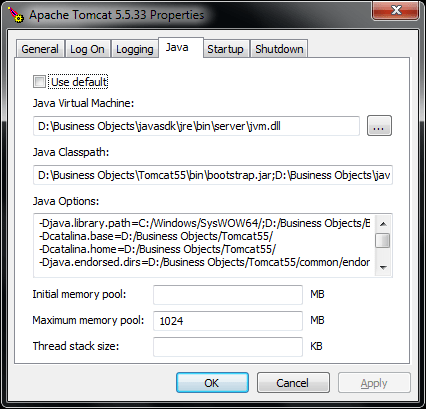
For the default installation of BOE XI 3.1, the following command opens Tomcat properties
"C:\Program Files\Business Objects\Tomcat55\bin\tomcat5w.exe" //ES//BOE120Tomcat

Slowly Changing Fact Tables
Let’s assume the organization has a huge number of customers and the task is to track very detailed customer profiles that include customer preferences, market segmentation, customer geography etc. The customer profiles are changing very often. The table would be very wide, huge and growing very fast.

We can split the dimension table in a number of smaller tables (mini-dimensions). The question is how to join them together to be able to get complete customer profile as at any point in time.
Snapshot Fact Table
The first design could be to add a snapshot factless fact table that joins these customer dimensions.

This is not the best solution as the current snapshot of the customers will be added to the fact table every load. The table will grow extremely fast.
Slowly Changing Fact Tables
Most often the rows inserted into the snapshot fact table will be the same as previous just with a new date. Therefore we can apply Slowly changing dimension technique for the fact table to avoid duplication of rows when the attributes are not changing. Let’s call this Slowly Changing Fact Table.

Customer RK is retained key of the Customer dimension, it is a surrogate key that does not change from one version of the row to another.
If any attribute of a customer profile changes, a new row will be inserted in the fact table. The number of rows in this fact table will be the same as the number of rows in the original dimension table Customer Profiles, however the data will take less of the disk space.
It is often more reasonable to apply “Slowly Changing Fact” technique to prevent the snapshot fact table from growing too fast.
References
The ideas here were taken from the Kimball Design Tip #50 Factless Fact Tables and diluted with my interpretations 🙂
What is Data Vault?
Data Vault model of data warehose proposed by Dan E. Linstedt is an alternative approach to the well known Ralph Kimball’s Dimensional Modeling and Bill Inmon’s 3NF data warehouse. It has not gained much recognition primarily because the author is not willing to share his ideas for free. You are welcome to support Dan by buying his book or attending Data Vault certification program 🙂
The main benefit of Data Vault is the ease of modification: you do not have to alter anything in your current model to add a new dimension or attributes of existing dimension.
The largest drawback of this modeling technique is the larger number of joins comparing to other modeling techniques, this hurts the performance. Also such complex data model makes it not relevant for the data access layer.
So let’s consider this modeling technique on an example starting from 3NF and dimensional model.
3NF Model
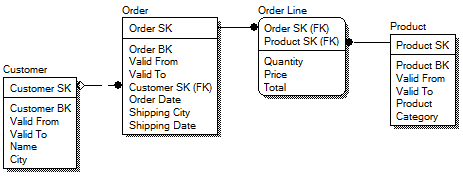
Consider the following 3NF data model. Usually it is close to the original model in the data source. There are three master tables (Customer, Order and Product) and one transactional table (Order Line).
SK fields are surrogate keys, BK fields are business keys aka natural keys. Surrogate key is a generated key used instead of combination of business key plus start date of validity (Valid From).

Dimensional Model
In our dimensional model, we have a fact table in the middle and dimension tables around the fact table. We added order date as a separate dimension. Customer is directly joined to the fact table.

Nothing new by now, right?
Data Vault
There are 3 types of tables in Data Vault model: Hub, Link and Satellite. Let’s consider on an example of transformation of the 3NF model to Data Vault model.
1) Instead of each master table in 3NF, we add a hub and a satellite.
2) Instead of the transactional table, we add Link table and Satellite.
3) Instead of the joins between master tables, we add Link tables.

Hub table – contains business key and retained key. The retained key is a key which is mapped to business key one-to-one. In comparison, the surrogate key includes time and there can be many surrogate keys corresponding to one business key. This explains the name of the key, it is retained with insertion of a new version of a row while surrogate key is increasing.
Why we need the retained key? There can be many sources, so we cannot use business key as it may have different type or different number of attributes in different source systems.
Link table – contains retained keys of the hubs. E.g. Customer Order Link links Customer Hub and Order Hub by the corresponding keys – Customer RK and Order RK. Note that one-to-many relationship was replaced with many-to-many relationship.
Satellite table – contains attributes of the original tables.
Resilience to Change
We can add new attributes to Customer (e.g. Customer Demographics) or even a new parent table (e.g. Delivery) without any change to the existing tables. We just need to add and populate new tables.

References
Note that this was simplified consideration, just to give an overview of the methodology. You can find detailed information on the web. I would recommend to start from wikipedia.
Top 144 Kimball Design Tips by the Number of References in Google Search
| Rank | # | Design Tip | Refs |
| 1 ) | 51 | Latest Thinking on Time Dimension Tables | 1310 |
| 2 ) | 5 | Surrogate Keys for the Time Dimension | 1140 |
| 3 ) | 122 | Call to Action for ETL Tool Providers | 616 |
| 4 ) | 115 | Kimball Lifecycle in a Nutshell | 519 |
| 5 ) | 46 | Another Look at Degenerate Dimensions | 443 |
| 6 ) | 48 | De-clutter with Junk Dimensions | 321 |
| 7 ) | 137 | Creating and Managing Shrunken Dimensions | 286 |
| 8 ) | 8 | Perfectly Partioning History with Type 2 SCD | 262 |
| 9 ) | 25 | Dimensional Models for Parent-Child Applications | 240 |
| 10 ) | 111 | Is Agile Enterprise Data Warehousing an Oxymoron? | 226 |
| 11 ) | 41 | Drill Down into a Detailed Bus Matrix | 166 |
| 12 ) | 50 | Factless Fact Tables | 163 |
| 13 ) | 1 | Guidelines for an Expressive Clickstream Data Mart | 152 |
| 14 ) | 34 | You Don’t Need an EDW | 151 |
| 15 ) | 91 | Marketing the DW/BI System | 145 |
| 16 ) | 59 | Surprising Value of Data Profiling | 144 |
| 17 ) | 106 | Can the Data Warehouse Benefit from SOA? | 137 |
| 18 ) | 107 | Using the SQL MERGE Statement for Slowly Changing Dimensions | 134 |
| 19 ) | 21 | Declaring the Grain | 124 |
| 20 ) | 56 | Dimensional Modeling for Microsoft Analysis Services | 121 |
| 21 ) | 2 | Multiple Time Stamps | 111 |
| 22 ) | 99 | Staging Areas and ETL Tools | 110 |
| 23 ) | 90 | Slowly Changing Entities | 103 |
| 24 ) | 89 | The Real Time Triage | 101 |
| 25 ) | 13 | When Fact Tables can be used as Dimensions | 96 |
| 26 ) | 20 | Sparse Facts and Facts with Short Lifetimes | 96 |
| 27 ) | 57 | Early Arriving Facts | 93 |
| 28 ) | 9 | Processing Slowly Changing Dimensions during Initial Load | 90 |
| 29 ) | 17 | Populating Hierarchy Helper Tables | 88 |
| 30 ) | 43 | Dealing With Nulls in a Dimensional Model | 85 |
| 31 ) | 81 | Fact Table Surrogate Keys | 83 |
| 32 ) | 37 | Modeling a Pipeline with Accumulating Snapshots | 78 |
| 33 ) | 15 | Combining SCD Techniques | 75 |
| 34 ) | 85 | Smart Date Keys to Partition Fact Tables | 69 |
| 35 ) | 136 | Adding a Mini-Dimension to a Bridge Table | 68 |
| 36 ) | 73 | Relating to Agile Methodologies | 67 |
| 37 ) | 49 | Off the Bench about the Bottoms Up Misnomer | 65 |
| 38 ) | 3 | Focus on Business Process, not Business Departments | 63 |
| 39 ) | 42 | Combining Periodic and Accumulating Snapshots | 62 |
| 40 ) | 39 | Bus Architecture Foundation for Analytic Applications | 60 |
| 41 ) | 28 | Avoiding Catastrophic Failure of the Data Warehouse | 58 |
| 42 ) | 139 | Much Ado About Nothing | 56 |
| 43 ) | 58 | BI Portal | 55 |
| 44 ) | 92 | Dimension Manager and Fact Provider | 55 |
| 45 ) | 95 | Patterns to Avoid when Modeling Header/Line Item Transactions | 54 |
| 46 ) | 35 | Modeling Time Spans | 52 |
| 47 ) | 121 | Columnar Databases: Game Changers for DW/BI Deployment? | 52 |
| 48 ) | 124 | Alternatives for Multi-valued Dimensions | 51 |
| 49 ) | 33 | Using CRM Measures as Behavior Tags | 48 |
| 50 ) | 16 | Hot Swappable Dimensions | 45 |
| 51 ) | 135 | Conformed Dimensions as the Foundation for Agile Data Warehousing | 45 |
| 52 ) | 97 | Modeling Data as Both a Fact and Dimension Attribute | 44 |
| 53 ) | 19 | Replicating Dimensions Correctly | 41 |
| 54 ) | 113 | Creating, Using, and Maintaining Junk Dimensions | 41 |
| 55 ) | 127 | Creating and Managing Mini-Dimensions | 41 |
| 56 ) | 134 | Data Warehouse Testing Recommendations | 40 |
| 57 ) | 87 | Combining SCD Techniques Having It Both Ways | 39 |
| 58 ) | 128 | Selecting Default Values for Nulls | 38 |
| 59 ) | 7 | Getting your Data Warehouse back on Track | 36 |
| 60 ) | 22 | Variable Depth Customer Dimensions | 36 |
| 61 ) | 30 | Put your Fact Tables on a Diet | 36 |
| 62 ) | 53 | Dimension Embellishments | 36 |
| 63 ) | 110 | Business Requirements Gathering Dos and Don’ts | 36 |
| 64 ) | 133 | Factless Fact Tables for Simplification | 36 |
| 65 ) | 12 | Accurate Counting with a Dimensional Supplement | 35 |
| 66 ) | 119 | Updating the Date Dimension | 35 |
| 67 ) | 6 | Showing the Correlation between Dimensions | 33 |
| 68 ) | 84 | Readers’ Suggestions on Fact Table Surrogate Keys | 33 |
| 69 ) | 141 | Expanding Boundaries of the Data Warehouse | 33 |
| 70 ) | 126 | Disruptive ETL Changes | 32 |
| 71 ) | 140 | Is it a Dimension, a Fact, or Both? | 32 |
| 72 ) | 4 | Fast Changing Complex Customer Dimensions | 31 |
| 73 ) | 102 | Server Configuration Considerations | 31 |
| 74 ) | 123 | Using the Dimensional Model to Validate Business Requirements | 31 |
| 75 ) | 100 | Keep Your Keys Simple | 30 |
| 76 ) | 129 | Are IT Procedures Beneficial to DW/BI Projects? | 30 |
| 77 ) | 61 | Handling all the Dates | 29 |
| 78 ) | 88 | Dashboards Done Right | 28 |
| 79 ) | 11 | Accurate Counts within a Dimension | 27 |
| 80 ) | 78 | Late Arriving Dimension Rows | 27 |
| 81 ) | 24 | Multinational Dimensional Data Warehouse Considerations | 26 |
| 82 ) | 14 | Arbitrary Balance Reporting with Transaction Facts | 24 |
| 83 ) | 26 | Audit Dimensions to Track Lineage and Confidence | 24 |
| 84 ) | 27 | Being Off-line as Little as Possible | 24 |
| 85 ) | 29 | Graceful Modifications to Existing Fact and Dimension Tables | 24 |
| 86 ) | 103 | Staffing the Dimensional Modeling Team | 24 |
| 87 ) | 105 | Snowflakes, Outriggers, and Bridges | 24 |
| 88 ) | 130 | Accumulating Snapshots for Complex Workflows | 24 |
| 89 ) | 18 | Taking the Publishing Metaphor Seriously | 23 |
| 90 ) | 32 | Doing the Work at Extract Time | 23 |
| 91 ) | 75 | Creating the Metadata Strategy | 23 |
| 92 ) | 45 | Techniques for Modeling Intellectual Capital | 22 |
| 93 ) | 104 | Upgrading your BI Architecture | 22 |
| 94 ) | 76 | Advantages of a 64-bit Server | 21 |
| 95 ) | 86 | Reference Dimensions for Infrequently-Accessed Degenerates | 21 |
| 96 ) | 93 | Transactions Create Time Spans | 20 |
| 97 ) | 96 | Think Like A Software Development Manager | 20 |
| 98 ) | 79 | Dangerously Large Dimension Tables | 19 |
| 99 ) | 82 | Pivoting the Fact Table with a Fact Dimension | 17 |
| 100 ) | 114 | Avoiding Alternate Organization Hierarchies | 17 |
| 101 ) | 109 | Dos and Don’ts on the Kimball Forum | 15 |
| 102 ) | 31 | Designing a Real Time Partition | 9 |
| 103 ) | 60 | Big Shifts in Business Intelligence | 9 |
| 104 ) | 63 | Building a Change Data Capture System | 9 |
| 105 ) | 65 | Document the ETL System | 9 |
| 106 ) | 112 | Creating Historical Dimension Rows | 9 |
| 107 ) | 10 | Is your Data Correct | 8 |
| 108 ) | 36 | To Be or Not To Be Centralized | 8 |
| 109 ) | 38 | Analytic Application—What’s That? | 8 |
| 110 ) | 40 | Structure of an Analytic Application | 8 |
| 111 ) | 44 | Reliance on the BI Tool’s Metadata | 8 |
| 112 ) | 47 | Business Initiatives versus Business Processes | 8 |
| 113 ) | 52 | Improving Operating Procedures | 8 |
| 114 ) | 62 | Alternate Hierarchies | 8 |
| 115 ) | 69 | Identifying Business Processes | 8 |
| 116 ) | 70 | Architecting Data for MS SQL Server 2005 | 8 |
| 117 ) | 101 | Slowly Changing Vocabulary | 8 |
| 118 ) | 108 | When is the Dimensional Model Design Done? | 8 |
| 119 ) | 125 | Balancing Requirements and Realities | 8 |
| 120 ) | 138 | Use a Design Charter to Keep Dimensional Design Activities on Track | 8 |
| 121 ) | 23 | Rolling Prediction of the Future | 7 |
| 122 ) | 54 | Delivering Historical and Current Perspectives | 7 |
| 123 ) | 68 | Simple Drill-Across in SQL | 7 |
| 124 ) | 80 | Dimension Row Change Reason Attributes | 7 |
| 125 ) | 83 | Resist Abstract Generic Dimensions | 7 |
| 126 ) | 94 | Building Custom Tools for the DW/BI System | 7 |
| 127 ) | 98 | Focus on Data Stewardship | 7 |
| 128 ) | 116 | Add Uncertainty to Your Fact Table | 7 |
| 129 ) | 118 | Managing Backlogs Dimensionally | 7 |
| 130 ) | 120 | Design Review Dos and Don’ts | 7 |
| 131 ) | 131 | Easier Approaches For Harder Problems | 7 |
| 132 ) | 55 | Exploring Text Facts | 6 |
| 133 ) | 64 | Avoid Isolating the DW and BI Teams | 6 |
| 134 ) | 67 | Maintaining Back Pointers to Operational Sources | 6 |
| 135 ) | 72 | Business Process Decoder Ring | 6 |
| 136 ) | 74 | Compliance-Enabled Data Warehouses | 6 |
| 137 ) | 77 | Warning: Summary Data may be Hazardous | 6 |
| 138 ) | 132 | Kimball Forum Update | 6 |
| 139 ) | 66 | Implementation Analysis Paralysis | 5 |
| 140 ) | 71 | Naming Conventions | 5 |
| 141 ) | 117 | Dealing with Data Quality: Don’t Just Sit There, Do Something! | 5 |
| 142 ) | 142 | Building Bridges | 5 |
| 143 ) | 143 | Enjoy the Sunset | 5 |
| 144 ) | 144 | History Lesson on Ralph Kimball and Xerox PARC | 4 |
BO XI 3.1 SP3 issue related to daylight savings time change
There is a quite serious issue in BO XI 3.1 SP3 related to the daylight savings time change. See the SAP note 1448881 for details.
After time change, BO generates thousands of failed instances for scheduled reports. The CMS database is growing very fast. BO system becomes very slow and stops working because of lack of space in tablespace or on the disk.
The quickest way to check if you have the issue is to connect to CMS database and query the number of rows in cms_infoobjects6.
SELECT Count(*) FROM CMS_INFOOBJECTS6
The normal amount of rows is usually less then 10 thousands. If there are more then 100 thousands rows, the system is probably affected by the issue.
To resolve the issue the reports should be rescheduled and the failed instances should be removed (see the SAP note for details). The error is fixed in FP3.6.
How to Obfuscate Password for Command Line Kettle
Pentaho Kettle does not provide possibility to obfuscate password in batch files (though the connection passwords are obfuscated in XML files).
You can write:
kitchen.bat /rep repos /job test /user admin /pass admin
but this will not work:
kitchen.bat /rep repos /job test /user admin /pass "Encrypted 2be98afc86aa7f2e4cb79ce71da9fa6d4"
Here “Encrypted 2be98afc86aa7f2e4cb79ce71da9fa6d4” is encrypted version of “admin”. You can get such string using kettle tool encr.bat.
This post describes a workaround.
Solution
A solution is to create a java wrapper for Kitchen.
1. Create java file Kettle1.java in the Kettle root with the following code:
import org.pentaho.di.core.exception.KettleException; import org.pentaho.di.kitchen.Kitchen; import org.pentaho.di.core.encryption.Encr; public class Kitchen1 { public static void main(String[] args) throws KettleException { // find argument /pass int i = 0; for (; i < args.length; ++i) if (args[i].equals("/pass") || args[i].equals("/password")) break; // decrypt password if necessary if (++i < args.length) args[i] = Encr.decryptPasswordOptionallyEncrypted(args[i]); // run Kitchen Kitchen.main(args); } }
2. Open command line. Run kitchen.bat without any parameters. This will initialize the necessary environment variable CLASSPATH.
3. Compile the java file with the following command:
javac Kitchen1.java
4. Copy Kitchen.bat to Kitchen1.bat and correct the last line. Replace
java %OPT% org.pentaho.di.kitchen.Kitchen %_cmdline%
with
java %OPT% Kitchen1 %_cmdline%
Now you can use Kitchen1.bat instead of Kitchen.bat. Both commands will work:
kitchen1.bat /rep repos /job test /user admin /pass admin kitchen1.bat /rep repos /job test /user admin /pass "Encrypted 2be98afc86aa7f2e4cb79ce71da9fa6d4"
5. Remove source file Kitchen1.java. Close command line.
Have fun 🙂