This code sample shows how BackgroundWorker can be used for progress bar.

Suppose we need to compare two database schemas to find out changes such as new tables, columns, and change of data type.
create user USER1 identified by USER1;
create user USER2 identified by USER2;
create table USER1.T1 (C int);
create table USER2.T1 (C int);
create table USER1.T2 (C int);
create table USER2.T3 (C int);
create table USER1.T4 (C int, D int);
create table USER2.T4 (C int);
create table USER1.T5 (C int, E int);
create table USER2.T5 (C int, E varchar(20));

Sometimes the only thing people do to backup BusinessObjects Enterprise server data is to backup CMS database. Unfortunately CMS database does not contain universes, documents and other stuff, it has only metadata about them (ids, descriptions etc). Backup of CMS database is not enough to restore the system from the scratch. Complete BIAR is often sufficient to restore the server.
The complete BIAR can be build from Import Wizard or using BIAR command line tool (biarengine.jar). The purpose of the command line tool is to automate importing and exporting of BIARs.
1. Create file export.properties in D:\Backup on the server with the following content:
action = exportXML
exportBiarLocation = complete.biar
userName = Administrator
password =
authentication = secEnterprise
CMS = localhost
exportDependencies = true
includeSecurity = true
exportQueriesTotal = 3
exportQuery1 = select * from CI_INFOOBJECTS
exportQuery2 = select * from CI_SYSTEMOBJECTS
exportQuery3 = select * from CI_APPOBJECTS
2. Create batch D:\Backup\backupBOE.bat executing the BIAR command line tool with the properties file.
java -jar "D:\Business Objects\common\4.0\java\lib\biarengine.jar" export.properties
3. Schedule the backupBOE.bat to run regularly in Windows scheduler.
Note that to import the BIAR you will have to use biarengine.jar and not Import Wizard. Import and export of BIAR files is not supported across tools. However it usually works if you export and import only universes and documents. I.e. when export.properties is:
action = exportXML
exportBiarLocation = complete.biar
userName = Administrator
password =
authentication = secEnterprise
CMS = localhost
exportDependencies = true
includeSecurity = true
exportQueriesTotal = 2
exportQuery1 = select * from CI_INFOOBJECTS
exportQuery2 = select * from CI_APPOBJECTS
In university I learned that adding zero does matter sometimes. However I did not expect to see this in Web Intelligence.
The fact is that the following two expressions are not the equal:
=(Average([Revenue])) In ([Year])
=(Average([Revenue])+0) In ([Year])
The query:
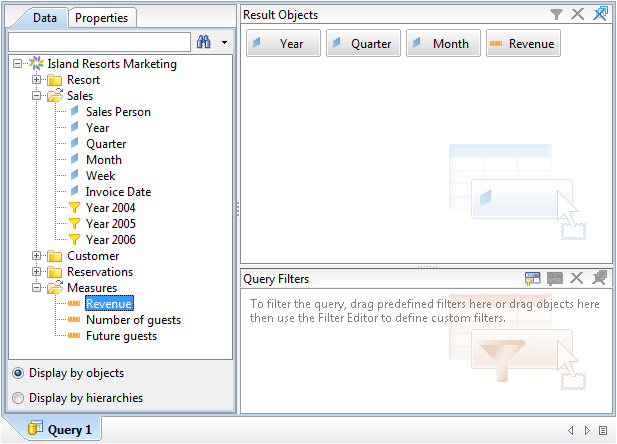
The result:

So the expression (Average([Revenue])+0) In ([Year]) is not equal to (Average([Revenue])) In ([Year]). But it is equal to: Average([Revenue] In ([Year];[Quarter];[Month])) In ([Year]).
The funny thing this that this is a normal behavior, and there is explanation for this (provided by SAP):
The output context of the aggregation is [Year] in both cases, however the input context of the aggregation is different. In first expression the input is Body ([Year], [Quarter]), however in the second expression the input is the detail context of the [Year], [Quarter] and [Month].
BusinessObjects Report Engine Java SDK is primarily used for Web Intelligence customization. This post describes how to start development of a command line tool. Such tools can make life of report developers easier. They can be used for:
You will need:
Download and extract Eclipse. Start it. Select default workspace folder (the new projects will be created in this folder). On the welcome page click “Go to Workbench”.
Create a new project:
1. File>New>Java Project
2. Specify project name (e.g. JavaTool).
3. Click Finish.
4. In the project folder on the disk (e.g. C:\Users\dbu\workspace\JavaTool\), create a folder lib and copy the jar files into it.
5. In Eclipse: Project>Properties>Java Build Path>Libraries, click “Add External JARs…”, OK.
6. Create package in the project. File>New>Package, type a name (e.g. org.bukhantsov.javatool), and click OK.
7. Create new class which will be starting point of the application. File>New>Class, type a name (e.g. Program), select option “public static void main” and click OK.
The generated class will be something like this:
package org.bukhantsov.javatool;
public class Program {
   /**
   * @param args
   */
   public static void main(String[] args) {
      // TODO Auto-generated method stub
   }
}
The first program will print all variables defined in Web Intelligence documents from a BOE server folder. Let’s consider functional blocks of the application.
The first thing you have to do is to connect to the BOE server.
ISessionMgr sessionMgr = CrystalEnterprise.getSessionMgr();
IEnterpriseSession enterpriseSession =
  sessionMgr.logon("Administrator", "", "localhost", "secEnterprise");
Replace “localhost” with the name of your BOE server.
When you connected, you can get the objects corresponding to Webi documents from CMS.
IInfoStore infoStore = (IInfoStore) enterpriseSession.getService("InfoStore");
String query = "select SI_NAME, SI_ID from CI_INFOOBJECTS "
             + "where SI_KIND = 'Webi' and SI_INSTANCE=0";
IInfoObjects infoObjects = (IInfoObjects) infoStore.query(query);
You can build and test the query in BusinessObjects Query Builder.
To open Webi document, you need to get a proxy to Webi report engine web service.
ReportEngines reportEngines =
   (ReportEngines) enterpriseSession.getService("ReportEngines");
ReportEngine wiRepEngine =
   (ReportEngine) reportEngines.getService(
      ReportEngines.ReportEngineType.WI_REPORT_ENGINE);
In a loop you can process all Webi documents from a folder
for (Object object : infoObjects) {
   IInfoObject infoObject = (IInfoObject) object;
   String path = getInfoObjectPath(infoObject);
   if (path.startsWith("/")) {
      DocumentInstance widoc = wiRepEngine.openDocument(infoObject.getID());
      // process document
      widoc.closeDocument();
   }
}
The function getInfoObjectPath builds path to the Webi document. Parent of Webi document is folder, and parent of folder is folder. The root folder has id = 0.
public static String getInfoObjectPath(IInfoObject infoObject) throws SDKException {
   String path = "";
   while (infoObject.getParentID() != 0) {
      infoObject = infoObject.getParent();
      path = "/" + infoObject.getTitle() + path;
   }
   return path;
}
ReportDictionary dic = widoc.getDictionary();
VariableExpression[] variables = dic.getVariables();
for (VariableExpression e : variables) {
   String name = e.getFormulaLanguageID();
   String expression = e.getFormula().getValue();
   System.out.println(" " + name + " " + expression);
}
An important part of each program is error handling.
public static void main(String[] args) {
   IEnterpriseSession enterpriseSession = null;
   ReportEngines reportEngines = null;
   try {
      // * connect to CMS
      // * get report engine proxy
      // * get Webi documents from CMS
      // * process the documents
   }
   catch (SDKException ex) {
      ex.printStackTrace();
   }
   finally {
      if (reportEngines != null) reportEngines.close();
      if (enterpriseSession != null) enterpriseSession.logoff();
   }
}
The complete code can be downloaded from here  (however without libs). You can import it from File menu: File > Import… > Existing Project into Workspace.
package org.bukhantsov.javatool;

import com.businessobjects.rebean.wi.DocumentInstance;
import com.businessobjects.rebean.wi.ReportDictionary;
import com.businessobjects.rebean.wi.ReportEngine;
import com.businessobjects.rebean.wi.ReportEngines;
import com.businessobjects.rebean.wi.VariableExpression;
import com.crystaldecisions.sdk.exception.SDKException;
import com.crystaldecisions.sdk.framework.CrystalEnterprise;
import com.crystaldecisions.sdk.framework.IEnterpriseSession;
import com.crystaldecisions.sdk.framework.ISessionMgr;
import com.crystaldecisions.sdk.occa.infostore.IInfoObject;
import com.crystaldecisions.sdk.occa.infostore.IInfoObjects;
import com.crystaldecisions.sdk.occa.infostore.IInfoStore;

public class Program {
   public static void main(String[] args) {
      IEnterpriseSession enterpriseSession = null;
      ReportEngines reportEngines = null;
      try {
         System.out.println("Connecting...");
         ISessionMgr sessionMgr = CrystalEnterprise.getSessionMgr();
         enterpriseSession = sessionMgr.logon("Administrator",
               "", "localhost", "secEnterprise");
         reportEngines = (ReportEngines) enterpriseSession
               .getService("ReportEngines");
         ReportEngine wiRepEngine = (ReportEngine) reportEngines
               .getService(ReportEngines.ReportEngineType.WI_REPORT_ENGINE);

         IInfoStore infoStore =
               (IInfoStore) enterpriseSession.getService("InfoStore");
         String query = "select SI_NAME, SI_ID from CI_INFOOBJECTS "
                      + "where SI_KIND = 'Webi' and SI_INSTANCE=0";
         IInfoObjects infoObjects = (IInfoObjects) infoStore.query(query);
         for (Object object : infoObjects) {
            IInfoObject infoObject = (IInfoObject) object;
            String path = getInfoObjectPath(infoObject);
            if (path.startsWith("/")) {
               DocumentInstance widoc = wiRepEngine.openDocument(infoObject.getID());
               String doc = infoObject.getTitle();
               System.out.println(path + "/" + doc);
               printDocumentVariables(widoc);
               widoc.closeDocument();
            }
         }
      }
      catch (SDKException ex) {
         ex.printStackTrace();
      }
      finally {
         if (reportEngines != null)
            reportEngines.close();
         if (enterpriseSession != null)
            enterpriseSession.logoff();
      }
      System.out.println("Finished!");
   }

   public static void printDocumentVariables(DocumentInstance widoc ) {
      ReportDictionary dic = widoc.getDictionary();
      VariableExpression[] variables = dic.getVariables();
      for (VariableExpression e : variables) {
         String name = e.getFormulaLanguageID();
         String expression = e.getFormula().getValue();
         System.out.println(" " + name + " " + expression);
      }
   }

   public static String getInfoObjectPath(IInfoObject infoObject)
                                        throws SDKException {
      String path = "";
      while (infoObject.getParentID() != 0) {
         infoObject = infoObject.getParent();
         path = "/" + infoObject.getTitle() + path;
      }
      return path;
   }
}
You can run the program Run>Run.
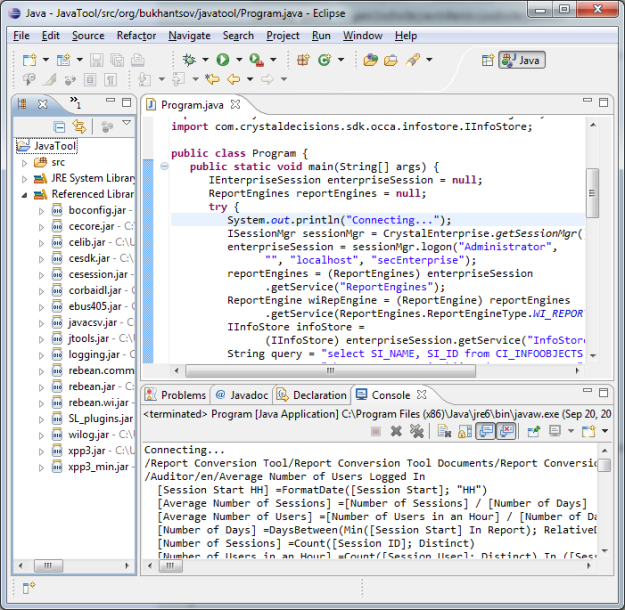
To build executable JAR: go File>Export, select Java>Runnable JAR file. Select launch configuration (you will probably have the only one), select destination, select “Package required libraries into generated JAR”, and click Finish.
You can run the program using the following command:
java -jar javatool.jar
Before running your tool on a bunch of reports it should be carefully tested. Especially if you do modifications.
The purpose of the code was to demonstrate how to access report engine. It does not demonstrate the best programming practices.
The Java SDK libraries can be found in the installation folder with BusinessObjects client tools or on the server.
C:\Program Files (x86)\Business Objects\common\4.0\java\lib
Required libraries:
  boconfig.jar
  cecore.jar
  celib.jar
  cesdk.jar
  cesession.jar
  corbaidl.jar
  ebus405.jar
  jtools.jar
  logging.jar
  rebean.common.jar
  rebean.jar
  rebean.wi.jar
  wilog.jar
  xpp3.jar
  xpp3_min.jar
  SL_plugins.jar

Project Qualification
Project Definition
Project Planning
Project Execution
Project Summation
Platform:
Assess and Define
Analyze and Evaluate
Design
Construct
Load
Final Test
Deploy Platform
Review
Ongoing Operations and Maintenance
Data Quality:
Analyze Data Quality
Resolve Data Quality Issues
Data Mining:
Define Data Mining Target
Create Data Mining Data Mart
SEMMA
Implement Model
Solution Assessment
Detailed Analysis
Customize Design
Construct, Customize and Configure
Calibration and Integration Test
Deploy Solution
Hand Over to Client
DELETE PLAN_TABLE;
EXPLAIN PLAN FOR
  SELECT * FROM t WHERE group2=1;
SELECT * FROM TABLE(dbms_xplan.display());
The Oracle utility creating PLAN_TABLE:
D:\Oracle\product\11.2.0\dbhome_1\RDBMS\ADMIN\utlxplan.sql
The Oracle utility displays the last explain plan. It displays also parallel query information if the plan happens to run parallel:
D:\Oracle\product\11.2.0\dbhome_1\RDBMS\ADMIN\utlxplp.sql
The utility that does not displays parallel query information (sequential).
D:\Oracle\product\11.2.0\dbhome_1\RDBMS\ADMIN\utlxpls.sql
An example of use of hierarchical queries to print the last explain plan:
SELECT
  LPad(' ', level-1) || operation || ' (' || options || ')' AS operation,
  coalesce(object_name, ' ') object,
  cost,
  cardinality,
  bytes
FROM
  plan_table
START WITH
  id = 0
CONNECT BY PRIOR
  id=parent_id;
Example of the result:
| OPERATION | OBJECT | COST | CARDINALITY | BYTES |
|---|---|---|---|---|
| SELECT STATEMENT () | 873 | 1000 | 20000 | |
| TABLE ACCESS (BY INDEX ROWID) | T | 873 | 1000 | 20000 |
| INDEX (RANGE SCAN) | T_GROUP2 | 5 | 1000 |

There are three tracks (beside Project Management) that running in paralel: technological, data and business intelligence. Yes, theoretically it is possible to run them in parallel, but it seems that such practice is quite rare.
It would be interesting to hear an example of a True Kimball Project.
The best way to determine the current version is through Software Inventory Tool. It has complete history of your BOE updates.
If you don’t have access to the server with the BOE, you can check the metrics of BusinessObjects servers.
Open CMC, go to Settings. In the properties, you will find the Product Version. Lookup BOE SP/FP using the reference table below.
If you have access to file system of the server, you may find the following method to be the quickest.
Browse to the folder with BO installation. For example:
C:\Program Files\Business Objects\BusinessObjects Enterprise 12.0\win32_86
Right-click the busobj.exe file, click Properties, on the the Version tab. Lookup BOE SP/FP using the reference table below.
There are many brain fitness exercises on the web that helps to develop mental skills. There are not that much programs that help to develop visual skills. Well I do not know any of such.
The purpose of this program is to develop visual skills. You could also improve your intellectual skills trying to figure out how to use it =).
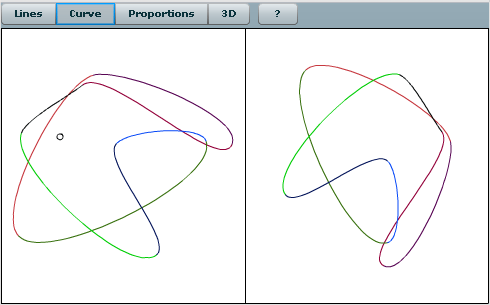
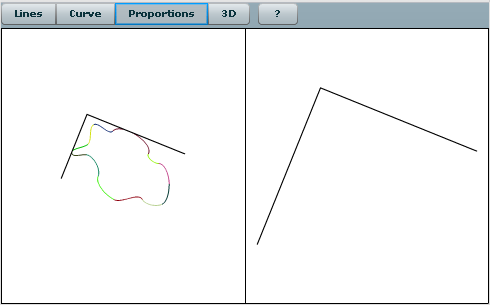
There are four games:
The basic principle behind most of them – you see a figure and a point on the left side, your task is to indicate location of the point on the right side. The complexity of the game is increasing with each correct answer and decreasing otherwise.
Click here to play Drawing tutor
The functionality is quite finished, but there is no fancy graphics etc. If you have ideas how to improve – please let me know.


 bukhantsov.org