How to get report drill filters

Here is an example how to get report drill filters.

DocumentInstance doc = reportEngine.openDocument(infoObject.getID());
Reports reports = doc.getReports();
for (int i = 0; i < reports.getCount(); i++)
{
    Report report = reports.getItem(i);
    DrillInfo drillInfo = (DrillInfo) report.getNamedInterface("DrillInfo");
    DrillBar drillBar = drillInfo.getDrillBar();
    for (int j = 0; j < drillBar.getCount(); ++j) {
        DrillBarObject drillBarObject = drillBar.getItem(j);
        System.out.println(
            String.format("%s='%s'", 
                drillBarObject.getName(), 
                drillBarObject.getFilter()));
    }
}
doc.closeDocument();

Result:

Service Line='Recreation'
Year=''

How to Test All Connection using BusinessObjects SDK

Problem

“I was doing some research in the past but could not find any solution out on the WEB, but think it would be helpful for BO admins. Tool, that can test all the universe connection from environment without using Designer tool, since in it you can test one connection at the time, but if you have 50 of them that is a lot of clicks. In our company , we often change database passwords and need to update connections setting, and sometimes we can miss 1-2 and few days later some reports will start failing or people will complain that they can run certain report (because database password was not been updated). So I was thinking about some utility that can use designer SDK that can go and loop through all the universe connections in the system and return pass or fail.”

Code

static void Main(string[] args)
{
   Application application = new Application();
   try
   {
      if (args.Length != 4)
      {
         application.LogonDialog();
      }

      Connections connections = application.Connections;
      foreach (Connection connection in connections)
      {
         Console.Write(connection.Name.PadRight(40));
         try
         {
            connection.Test();
            Console.WriteLine("OK");
         }
         catch (Exception ex)
         {
            Console.WriteLine(ex.Message.Replace("\n","").Replace("\r",""));
         }
      }
   }
   catch (Exception ex)
   {
      Console.WriteLine(ex.ToString());
   }
   finally
   {
      application.Quit();
   }
}

Downloads

download source Source
download executable Executable for BOE XI 3.1 SP3 FP3.2

The executable should be run from command line as the result is printed to standard output. The arguments are: username password server auth. E.g.

TestConnections.exe Administrator "" localhost secEnterprise > c:/connectionstest.txt

If you do not specify the arguments, the designer logon dialog will appear.

Crystal Reports vs Web Intelligence

Crystal Reports and Web Intelligence are two technologies from SAP BusinessObjects portfolio that provide possibility to build reports. Web Intelligence is a perfect tool for ad-hoc reporting. It is very easy to build report from a scratch even for a new user. However when the requirements are too specific, when it is necessary to build in a sophisticated logic or when a precise formatting is required, the simplicity becomes too restrictive and the reports turn into a terrible mix of miscellaneous tricks. In this situation, Crystal Reports is much better choice. Below is a technical comparison of Crystal Reports and Web Intelligence written by my colleague Maria Ruchko, an expert in both these technologies.

Crystal Reports

Web Intelligence

Data Source Crystal Reports can use universes or access a database directly. Some advanced features of universes (such as contexts) are disabled in Crystal. Database Direct connection and Universe cannot be used together. Web Intelligence can only use universes.
Prompts Report data not necessarily must be filtered by the prompt value. Prompts’ Lists of Values can be defined in the report. Default value can be calculated. Prompts within reports must be used for filtration of data (this restriction can be overcome but some tricks must be used). Lists of values are based on the database values. Customized or calculated lists of values require placing prompt into Universe (which means universe customization). Default value cannot be calculated. Current Date cannot be set as default in Date prompt.
Layout Many tools are available for work with layout  (rulers, guidelines). It is also very flexible because formulas can be used for determining position of the fields, suppression of rows etc. Especially good for working with single table reports. If report has more than one table, subreports must be used which might affect performance Web Intelligence is not flexible and it is difficult (sometimes impossible) to get precise layout, very difficult to get flexibility based on parameters (e.g. showing dynamic number of columns). Not a problem to place more than one table within the report.
Development Crystal Reports Designer license and Crystal Reports Writer are required to develop and modify reports. Reports can be developed or modified using Infoview or Webi Rich Client.
Viewing Reports can be viewed and scheduled in Infoview Reports can be viewed and scheduled in Infoview
Development Time It takes longer to develop simple report in Crystal Reports than Web Intelligence, but complex reports development time is more predictable (no need to invent tricks). It is easier to implement complex logic. Simple reports can be developed on fly if there is an intuitive universe. It takes a lot of time to develop a report based on a complex universe (to overcome restrictions of the tool). For complex reports it is sometimes easier to develop a customized universe specially for the report and put all logic in this universe.
Users Office employees who have to report in the same form (with some deviations which can be handled by parameters) or management for some standard reports or analytical reports (if manager’s are not technically qualified to build Webi reports or universe is too complex for understanding) Top management and executives, who use report for decision making (not for daily scheduled standard reports), want to make ad-hoc analysis, dig into data and decide what data they prefer to see in the report when they build it.
Notifications Crystal Reports can send an e-mail to users based on alerts, when report data meets some condition (e.g. if profit less than 0) The similar option is not available
Export formats XLS, PDF, CSV, TTX, RTF, HTML, XML XLS, PDF, CSV
Upgrade and recovery If a report is based on database directly (not using universe), upgrade can affect report only if database structure was changed. It is easy to remap fields though, which means that report can be recovered anyway. Universe changes may affect a report if an object used by the report is deleted. Sometimes it can be difficult or impossible to recover reports if the original universe was modified or removed by mistake.

Printing LoV names with Designer COM SDK

Tutorial “Getting started with Designer SDK”

using System;
using Designer;
namespace ConsoleApplication1
{
    class Program
    {
        delegate void CleanUpMethod();

        static void Main(string[] args)
        {
            Application application = new Application();
            application.Interactive = false;

            CleanUpMethod cleanUp = delegate { application.Quit(); };
            Console.CancelKeyPress += delegate { cleanUp(); }; // to handle Ctrl+C

            try
            {
                application.Logon("Administrator", 
                    "", "localhost", "secEnterprise");                
                Universe universe =
                    application.Universes.OpenFromEnterprise(
                        "webi universes",
                        "Island Resorts Marketing",
                        false);
                PrintClasses(universe.Classes, "");
                universe.Close();
            }
            catch (Exception ex)
            {
                Console.WriteLine(ex.ToString());
            }
            finally
            {
                cleanUp();
            }
        }

        static void PrintClasses(Classes classes, String path)
        {
            foreach (Class theclass in classes)
            {
                String path2 = path + "/" + theclass.Name;
                foreach (Designer.Object theobject in theclass.Objects)
                {
                    if (theobject.HasListOfValues)
                    {
                        Console.WriteLine(path2 + ";" 
                            + theobject.Name + ";" 
                            + theobject.ListOfValues.Name);
                    }
                }
                PrintClasses(theclass.Classes, path2);
            }
        }

    }
}

Use of Outer Joins in Combination with Self Restricting Joins

Problem

BusinessObjects use some algorithm for SQL generation based on objects selected in the query and the universe. There are a number of parameters that control SQL generation. The problem is that in some cases BO generates SQL that is not intuitively expected.

What we would expect is that the self restricting joins are applied to the tables and then the tables are joined.

When SELFJOINS_IN_WHERE=No, the self restricting joins are put in the ON clause of the SQL. The generated SQL ignores the self restricting join on the table FACT.

SELECT DISTINCT
  FACT.A,
  DIM.B
FROM
  DIM  RIGHT OUTER JOIN  FACT
  ON  (FACT.DIM_ID=DIM.DIM_ID  AND  FACT.TYPE=0  AND  DIM.TYPE=0)

When SELFJOINS_IN_WHERE=Yes, the self restricting joins are put in the WHERE clause.  The effect of this is that the outer join turns into inner join in the generated SQL.

SELECT DISTINCT
  FACT.A,
  DIM.B
FROM
  DIM  RIGHT OUTER JOIN  FACT
  ON  (FACT.DIM_ID=DIM.DIM_ID)
WHERE
  ( FACT.TYPE=0  )
  AND  ( DIM.TYPE=0  )

In fact, we expect the following SQL:

SELECT DISTINCT
  FACT.A,
  DIM.B
FROM
  DIM  RIGHT OUTER JOIN  FACT
  ON  (FACT.DIM_ID=DIM.DIM_ID  AND  DIM.TYPE=0)
WHERE
  ( FACT.TYPE=0 )

BusinessObjects cannot place self restricting joins conditionally depending on the join structure. (Probably this will make the algorithm too complex, so this is not a bad thing)

A workaround is to avoid using of self joins using derived tables.

A Solution when SELFJOINS_IN_WHERE=No

Replace FACT with a derived table FACT_D

SELECT DIM_ID, A FROM FACT WHERE FACT.TYPE=0

The generated SQL will be:

SELECT DISTINCT
  FACT_D.A,
  DIM.B
FROM
  DIM RIGHT OUTER JOIN (
  SELECT DIM_ID, A FROM FACT WHERE FACT.TYPE=0
  ) FACT_D
  ON (DIM.TYPE=0  AND  FACT_D.DIM_ID=DIM.DIM_ID)

A Solution when SELFJOINS_IN_WHERE=Yes

Replace DIM with a derived table DIM_D

SELECT DIM_ID, B FROM DIM WHERE DIM.TYPE=0

The generated SQL will be:

SELECT DISTINCT
  FACT.A,
  DIM_D.B
FROM
  (
  SELECT DIM_ID, B FROM DIM WHERE DIM.TYPE=0
  ) DIM_D RIGHT OUTER JOIN FACT
  ON (FACT.DIM_ID=DIM_D.DIM_ID)
WHERE
  ( FACT.TYPE=0 )

Is the use of Enterprise SDKs in a thick-client/desktop application supported

Question:

BusinessObjects Enterprise XI, Crystal Reports Server XI, and Crystal Enterprise contain COM, .NET, and Java SDKs. Is the use of these SDKs in a thick-client or desktop application supported?

Answer:

No, the use of BusinessObjects Enterprise SDKs is not supported in a thick-client or desktop application because the BusinessObjects Enterprise SDK is only intended for use in web applications. To build BI platform thick-client or desktop applications, use Business Objects web services.

 Explanation:

  • Thick client applications are not supported because of the CORBA implementation we use with the Enterprise services.
  • Thick client applications are typically installed on many client systems. The large install base would put a strain on the CMS because an individual CORBA connection would be created for each client logon to the CMS server.
  • Web applications don’t present this problem because the application server will only create one CORBA connection to the CMS server for all the client sessions initiated.
  • While the thick client application will likely work without error, there is no escalation path to the technical development team for any issues specifically related to the thick client application. Any issue must be reproduceable in a web environment in order to be tracked as a bug.
  • Only the Enterprise Web Services SDK is supported in a thick client application.

Source:

SAP note 1219135 and related discussion

BusinessObjects Enterprise XI 3.1 – Supported Platforms

Links

Search on SAP

Supported Browsers BOE XI 3.1 SP3

Supported Browsers BOE XI 3.1 SP5

See the SAP documentation for details.

What is inside an OLAP Cube

What is inside an OLAP cube and why we need a special data structure for it? What is the difference between OLAP cube and the data in a relational database?

When I tried to find information about the data model behind OLAP cubes. It appeared not so easy. First, there is no common approach to OLAP. Each vendor use own physical model of the cube and own algorithm. Second, the multidimensional approaches far more complex then approaches used for relational databases. This post describes one of the approaches.

Let’s consider a simplistic example: there are tree dimensions – Product, Customer and Date. The fact is a sale of a product to a customer on a date. The measures could be the number of items sold and the total price. Both in OLAP and RDB, we store this data as a list of records. Each record contains the reference to the product sold, the customer, the date, the number of items sold and the total price. The difference is aggregations and indexing.

To provide consistent performance OLAP system stores and maintains aggregations for all possible subsets of dimensions (well, not always “all”). A cube base on a subset of dimensions is called cuboid or group-by. For n-dimensional cube there are 2^n dimension combinations. So the full data cube has 1 base cube and 2^n-1 cuboids. E.g.

  • Base cube: (Product, Customer, Time)
  • 2 dimensional cuboids: (Product, Customer), (Customer, Time), (Product, Time)
  • 1 dimensional cuboids: (Product), (Customer), (Time)
  • 0 dimensional cuboid.

This inherent feature of OLAP system can be modeled in RDB but this is not so easy and natural. The indented use of OLAP is ad hoc queries, with unpredictable set of dimensions, therefore the best solution would be to store all possible combinations. RDB is mostly used for a settled number of queries, so storing many aggregations could be wasteful.

Another requirement is the consistent performance of slicing (when one or more attributes are restricted to a single value). RDB indexes are usually not good for this purpose. Multidimensional data requires multidimensional access methods. The basic problem is the nature of multidimensional data:

There exists no total ordering among spatial objects that preserves spatial proximity. In other words, there is no mapping from two- or higher- dimensional space into one-dimensional space such that any two objects that are spatially close in the higher-dimensional space are also close to each other in the one-dimensional sorted sequence. This makes the design of efficient access methods in the spatial domain much more difficult than in traditional databases, where a broad range of efficient and well-understood access methods is available.

A solution is to use heuristics that preserves spatial proximity at least to some extent. One of the efficient approaches is Hilbert R-Tree.

Hilbert R-Tree

Let’s consider 2 dimensional cuboid e.g. Product, Time.

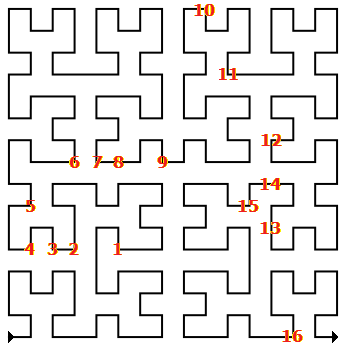
We build a Hilbert space filling curve. It will give us a basis for one dimensional ordering of the data.

One dimensional ordering is necessary as the data is stored on the disk which has one dimensional nature. It is important to store the data in an order that allows efficient multidimensional queries. In case of Hilbert space filling curve, it is possible to build an efficient index.
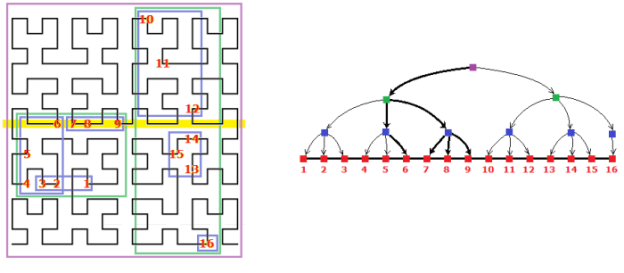
In one dimensional space, B-tree (balanced tree) is commonly used for indexes, it allows searches, sequential access, insertions, and deletions in logarithmic time. In multidimensional space, R-tree is often used. R-tree is generalization of B-tree. It groups nearby points and represents them with their minimum bounding rectangle in the next higher level of the tree.

Hilbert R-tree is an R-tree variant that uses the Hilbert curve to impose a linear ordering on the data rectangles. Hilbert-Pack algorithm can be used to create the R-tree.

In the example, we group points 1..3 into first rectangle, 4..5 into second rectangle, 7..9 into third rectangle. After this, these three rectangles are covered with fourth rectangle. This fourth rectangle is the minimum bounding rectangle of the first three. And so on.

The result is a balanced tree (all leaf nodes are on the same level). The maximum number of rectangles in a node called capacity. In the example it is 3.

The intuitive reasons why our Hilbert-based methods will result in good performance is that the resulting R-tree nodes tend to be small square-like rectangles. This indicates that the nodes will likely have small area and small perimeters. Small area values result in good performance for point queries; small area and small perimeter values lead to good performance for larger queries. It was also shown experimentally that the Hilbert curve achieves the best clustering among other space filling curves.

Search is starting from the root, it descends the tree and examines all nodes that intersect the query rectangle (yellow). At the leaf level, it reports all entries that intersect the query rectangle as qualified data items.
Ok, that is basically it. This was short consideration of an OLAP cube structure. More details here:

Removing the Failed Instances Manually From the Database

The error in BO XI 3.1 SP3 causes millions of failed instances generated (SAP note 1448881 “Multiple instances spawned after daylight savings time change”). If the problem is not solved timely, the BO is getting slow, services is starting to fail often. It is usually possible to remove the instances programmically (SAP note 1568718 “How to delete all failed instances in XI3.1 programmatically”), however this script does not work if the number of the failed instances large – millions of records.

SAP note 1654183 “How to delete all the failed instances in SAP BusinessObjects Enterprise manually” is not that clear and more over it is incorrect. The correct script (for Oracle) is given below.

1. Stop SIA.
2. Make backup of CMS database and FileStore folder.
3. Execute the following script:

CREATE TABLE cms_infoobjects6_temp AS (
    SELECT * FROM cms_infoobjects6
    WHERE schedulestatus != 3 
    OR schedulestatus IS NULL);

TRUNCATE TABLE cms_infoobjects6;

INSERT INTO cms_infoobjects6 
    SELECT * FROM cms_infoobjects6_temp;

COMMIT;

DROP TABLE cms_infoobjects6_temp;

4. Start SIA and test the system.