Category Archives: Business Objects

BusinessObjects

BO XI 3.1 SP3 issue related to daylight savings time change

There is a quite serious issue in BO XI 3.1 SP3 related to the daylight savings time change. See the SAP note 1448881 for details.

After time change, BO generates thousands of failed instances for scheduled reports.  The CMS database is growing very fast. BO system becomes very slow and stops working because of lack of space in tablespace or on the disk.

The quickest way to check if you have the issue is to connect to CMS database and query the number of rows in cms_infoobjects6.

SELECT Count(*) FROM CMS_INFOOBJECTS6

The normal amount of rows is usually less then 10 thousands. If there are more then 100 thousands rows, the system is probably affected by the issue.

To resolve the issue the reports should be rescheduled and the failed instances should be removed (see the SAP note for details). The error is fixed in FP3.6.

Continue reading

Fun with Query Builder

I cannot explain this.

SELECT SI_ID, SI_NAME, SI_CUID FROM CI_INFOOBJECTS WHERE SI_ID=23
1/1
Properties
SI_NAME Root Folder
SI_CUID ASHnC0S_Pw5LhKFbZ.iA_j4
SI_ID 23
SELECT SI_ID, SI_NAME, SI_CUID, SI_PARENTID, SI_PARENT_CUID
FROM CI_INFOOBJECTS WHERE SI_PARENTID=23
1/10
Properties
SI_NAME Report Conversion Tool
SI_CUID AY9zJ8BgaF9OucZ2h2slcJM
SI_PARENT_CUID ASHnC0S_Pw5LhKFbZ.iA_j4
SI_PARENTID 0
SI_ID 123

Why the hell SI_PARENTID=0 in the result if SI_PARENTID=23 is in the query restriction?

Hierarchies in Webi

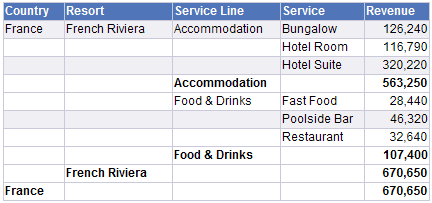
The task is to display a fixed level hierarchy together with totals for each level. This can be done using breaks. The most straightforward implementation might look like this:

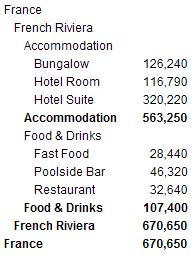
If there are many levels and the level names are long, the table will be very wide, with a lot of empty space. It would be better to have more compact layout, for example:

This post describes how to implement such layout. Continue reading

Calculated Default Value for a Prompt

It is possible to specify a constant default value for a prompt. But what if the default value need to be calculated.

For example, there should be an optional prompt for the statement date in the report. If the date is not specified by the user, the current date should be used.

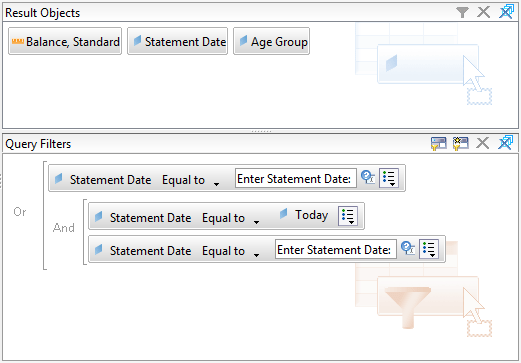
It is possible to implement the logic with the following query filter:

If the date is not specified in the prompt, the optional prompts are ignored and the condition will be reduced to:

Statement Date Equal to Today

If the date is specified, the condition will be equivalent to:

Statement Date Equal to Prompt "Enter Statement Date"

because

A or (A and B) <=> (A and True) or (A and B) <=> A and (True or B) <=> A

Time Sheet Status – Webi Exercise

It seems to be a good Webi exercise (for beginners).

Employees submit weekly time sheets. Each time sheet has time sheet lines. Time sheet line can have one of three statuses: Submitted, Approved and Rejected.

The status of the time sheet is defined by the statuses of the time sheet lines:

  • When for a week one or more lines are rejected the whole time sheet status is “Rejected”.
  • When for a week one or more lines are submitted, there are no lines rejected, but there can be lines approved, the time sheet status is “Submitted”.
  • When all lines are approved the time sheet status is “Approved”.
  • When there are no time sheet lines, the status is “Missing”.

Solution…

Continue reading

Break on Measure in Web Intelligence

Sometimes it makes good sense to apply break on measures.

Let’s build a query based on the eFashion universe that contains product Lines, product Promotion Cost, Store Name, and Sales Revenue. Promotion cost is money spent for advertising a product, it is not directly related to stores. So the report is showing the same product promotion cost for different stores.

Technically speaking, the queries from two contexts are merged in the table. The first query is from “Promotion” context, it contains [Lines] and [Promotion Cost USD]. Second query is from “Shop facts” context and it contains [Lines], [Store name], and [Sales revenue]. The queries are merged by [Lines].
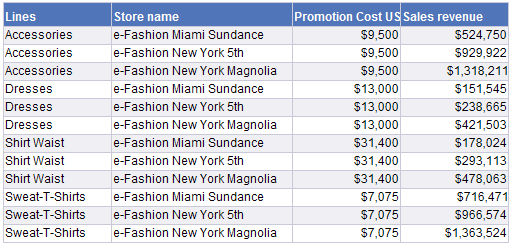
This looks not nice because it might seem that the same amount is spent for each store for a product. The readability can be improved by defining break on the measure.

Add break on Promotion Cost, Remove break header and footer rows, Show table header, Center values across break
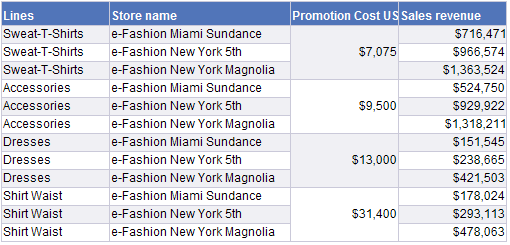
However defining the break only on the measure is a wrong way. You can get very unexpected results. For example, when the promotion cost will be same for a couple of products, or when a calculation is used (see a puzzle in the end of the post). It would be more correct to define a break by product lines and then the break by promotion cost.

Remove break from “Promotion Cost”, Add break for the column “Lines”, and then again Add break for the column “Promption Cost”, Remove break header and footer rows, Show table header, Center values across break
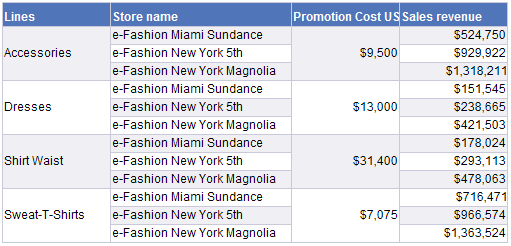
Ok, that’s it. The point it is if you want to have a break for a measure, you have to define break for the corresponding dimension.

The next question is what if we do not want to see the break by Lines as a break, i.e. we want the product line name in each row. A simple solution is to duplicate column Lines, and “hide” the one with the break.

Add another column “Lines”, change expression for the first column to =[Lines]+””, Hide the column “Lines”
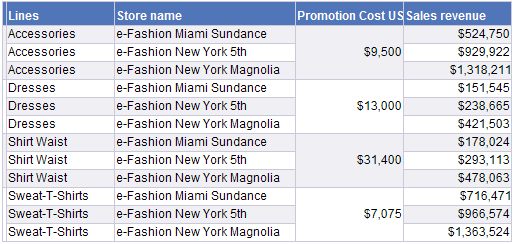
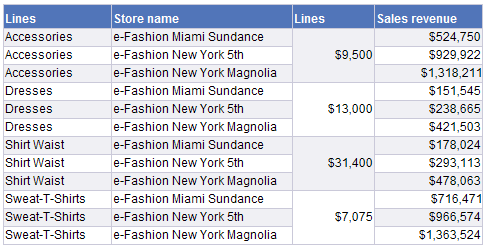
This does not look neat because you cannot really hide the column. But you can build nice appearance using alert that replaces value of the cell with Promotion Cost.

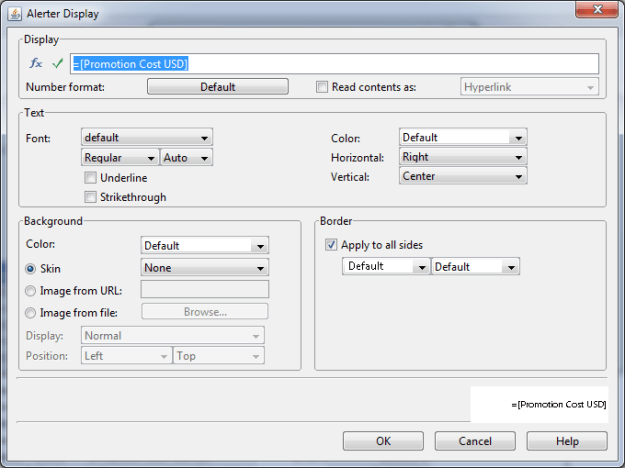
Remove column “Promption Cost”, Expand the first column (“Lines” with break), Move it to the place of “Promotion Cost”, create alert with condition “Cell content is not null”, specify =[Promotion Cost USD] in the Display field, configure alignment and color.
Now a puzzle for geeks

You have a table with Lines, Store name, Promption Cost USD, and Sales revenue, the break is defined on the column Promption Cost USD.

Replace expression in the column Promption Cost USD with:

=If [Lines]="Dresses" Or [Lines]="Accessories" Then [Promotion Cost USD] Else 0

and explain the result:
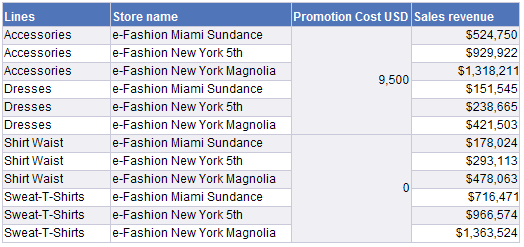
Why is 9,500 shown for “Dresses” and not 13,000?

How to Change SQL in Webi Document Using Java RE SDK

This post briefly describes how to change SQL in Webi document. The following code will work for a Webi document with one simple query (say one object, without subqueries, combined queries, etc):

DocumentInstance widoc = wiRepEngine.openDocument(31223); // 31223 is ID of the webi document
SQLDataProvider sdp = (SQLDataProvider)(widoc.getDataProviders().getItem(0)); 
SQLSelectStatement sss = (SQLSelectStatement)(sdp.getSQLContainer().getChildAt(0));
sss.setSQL("SELECT * FROM (" + sss.getSQL() +") A");
sdp.validateSQL();
sdp.changeSQL();
widoc.save();
widoc.closeDocument();

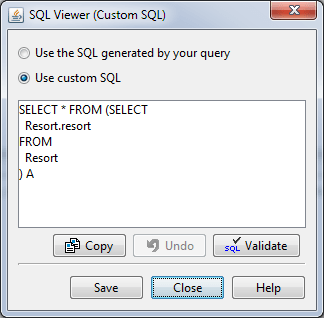
If the document contained the only object “Resort” from universe “Island Resorts Marketing”, the query was:

SELECT
  Resort.resort
FROM
  Resort

After applying the script the query will become:

Note that this is now a custom query.

Not clear?

Try to start from this: https://bukhantsov.org/2011/08/getting-started-with-businessobjects-java-sdk/ 🙂

Use OLE DB instead of ODBC for SQL Server

The quickest way to set up connection to SQL Server database from BusinessObjects is to create 32 bit System ODBC data source.

The most irritating drawback of this approach is that if there is an error in universe, it is not possible to see the real error message. For all kinds of errors, you will see the same message:

A database error occured. The database error text is: [Microsoft][ODBC Driver Manager]Statement(s) could not be prepared.. (WIS 10901)

A solution is to use OLE DB connection. In this case the error message will be more descriptive, e.g.:

First, you need to install Microsoft SQL Server 2008 Native Client.

Second, set up BusinessObjects connection to use SQL Server OLE DB instead of ODBC using the database parameters. Open connection (in Tools>Connections), click button Back, and select OLE DB as network layer, and set up the connection.