Category Archives: Business Objects

BusinessObjects

InfoStore Query Builder to Check Relations

There is a nice tool in CMC that allows to check relations between objects. Something similar can be done in the query builder with some non documented features.

For instance, to find all reports that use a universe Finance, you can write:

SELECT *
FROM ci_infoobjects, ci_appobjects, ci_systemobjects
WHERE PARENTS("si_name='Webi-Universe'","si_name='Finance'")

PARENTS has two arguments. First is the relation type, second is the reference object.

If you want to find opposite – all universes used by a report, you can write

SELECT *
FROM ci_infoobjects, ci_appobjects, ci_systemobjects
WHERE CHILDREN("si_name='Webi-Universe'","si_name='Balance Sheet'")

What are the possible types of relations (first argument)? You can find the list querying CMS:

SELECT si_name FROM ci_systemobjects WHERE si_relation_table_name='RELATIONS'

Now you can also build such queries and export result to to Excel in InfoStore Query Builder:

Problem with OpenDocument inside IFrame in Internet Explorer

Symptoms

It is not possible to login to BusinessObjects using Internet Explorer when the report is embedded into another web page using IFRAME and OpenDocument link.

<iframe width=100% height=100% 
src="http://SERVERNAME:8080/OpenDocument/opendoc/openDocument.jsp?sType=wid&sDocName=Balance+Sheet">

You get the login screen but nothing happens when you try to login (you are staying on the same page). The OpenDocument link works when it is opened in the browser directly.

Cause

This happens because Internet Explorer gives lower level of trust to IFRAME pages. IE calls this “third-party” content. If the page inside the IFRAME doesn’t have a Privacy Policy, its cookies are blocked (which is indicated by the eye icon in status bar, when you click on it, it shows you a list of blocked URLs). The cookies are used to store BO session. As the session cannot be saved, the user cannot login.

Resolution (Tomcat)

1. Create folder w3c in

[Business Objects]\Tomcat55\webapps\

2. Create file p3p.xml in the folder with the following code:

<META>
  <POLICY-REFERENCES>
    <POLICY-REF about="/w3c/policy.xml">
      <INCLUDE>/</INCLUDE>
      <COOKIE-INCLUDE/>
    </POLICY-REF>
  </POLICY-REFERENCES>
</META>

How to Replace a Table with a Derived Table

This post describes the detailed steps to replace a database table with a derived table. Also it describes how Universe Documenter can help to achieve the perfect quality even for such complex modification of a universe.

You may need to replace a table with a derived table if your universe is affected by the self-outer join issue.

We will consider the following schema:

The task is to replace BO_CUSTOMER with a derived table to avoid self join in the universe database structure.

0) Make a backup of the universe and the reports that use the universe

Also export a copy of the universe to CMS. This will be required on the step 9 for verification.

1) Create the derived table that contains SQL with the self join SQL in WHERE

Create table BO_CUSTOMER_ with the following SQL:

SELECT * FROM BO_CUSTOMER WHERE ACCESSUSERNAME=@VARIABLE('BOUSER')

2) Switch all joins from the original table to the derived table.

Edit the join expression. Do not change tables in the combo-box, this may screw up the select.

The self join BOEMPLOYEE.ACCESSUSERNAME=@VARIABLE(‘BOUSER’) should be removed. You will be prompted that it is used in contexts. Ignore this message.

The contexts do not need to be updated.

3) Update objects expression and the expression of the predefined conditions

  • Select first class in the universe.
  • Hit Ctrl+F.
  • Enter BO_CUSTOMER in the field “Find what”
  • Enter BO_CUSTOMER_ in the field “Replace”
  • Select “SQL” in the Look Also In
Sometimes Replace All works fine, but it would be more preferable to change objects one by one.

4) If the table is a fact table and aggregate awareness is used in the universe, check if you need to update aggregate navigation.

  • Open aggregate navigation
  • Select the fact table
  • Select option “Incompatibles only”
  • Check objects and predefined conditions.
  • If the list “Associated Incompatible Objects” is empty, you do not need to do anything.
  • If the list is not empty, the same incompatibilities must be defined for the derived table.
(This is not needed in our example)

3) Check if you are lucky

Try deleting the original table. If the table was removed without prompts, you finished with the table. If you see the prompt that the table is used in object definitions, do not remove the table.
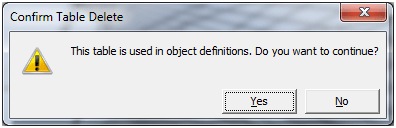
  • The table can be used in index awareness.
  • The table can also be used to force join with another table.

6) Modify the objects that use join forcing

  • Click right button on BO_CUSTOMER
  • In pop-up menu select View associated objects
  • If no objects highlighted in class structure, go to the next step
  • Go through all highlighted objects
  • The select of such objects do not contain reference to the table BO_CUSTOMER because we replaced all BO_CUSTOMER to BO_CUSTOMER_ on the step 3.
  • Click Tables and change BO_CUSTOMER to BO_CUSTOMER_ holding Ctrl button.

7) Update objects for which index awareness is defined.

There is no easy way to find the objects that has index awareness in Universe Designer. You need to go through all objects and check Keys in properties:

The easy way is to build the list of index awareness using Universe Documenter

8) Save, export

9) Verify

The modification described here is very complex. It is easy to make a mistake. Luckily it is possible to use the tool Universe Documenter to identify the mistakes.

To reduce the number of differences, import the copy of the original universe and change the name of the replaced table to BO_CUSTOMER_ and export the universe back to CMS.

Import the modified copy and the corrected universes in Universe Documenter, perform diff (How to diff universes using Universe Documenter) and check all highlighted differences. The two universes must be almost identical with an exception that the BO_CUSTOMER_ in the corrected universe is a derived table.

Problem of using self joins in combination with outer joins

Problem

(It is assumed that the parameter ANSI92 of the universe is set to Yes, the parameter SELFJOINS_IN_WHERE is either not set or is set to No.)

The table A is affected by the self/outer join issue if it has a self join and it is joined to a table B with the following outer join:

If a query use these two tables, the self join SQL will be put into the outer join SQL causing the generated SQL query to ignore the self join.

If the query contains at least one inner join of A with another table, the issue will not appear because the self join will be put into the inner join SQL, so the self join will be applied to the table A. Due to this, the issue appear rarely.

Example 1

The table structure contains two tables BOEMPLOYEE and EXVENDOR. BOEMPLOYEE has a field ACCESSUSERNAME which is used to implement access control to the table.

If the query uses these two tables, the self join will be put into the outer join SQL and therefore ignored:

SELECT
  BOEMPLOYEE.NAME,
  EXVENDOR.NAME
FROM EXVENDOR RIGHT OUTER JOIN BOEMPLOYEE
  ON (BOEMPLOYEE.VENDORNUMBER=EXVENDOR.VENDORNUMBER
      AND BOEMPLOYEE.ACCESSUSERNAME = @VARIABLE('BOUSER'))

Example 2

Here we have a table EXFINANCEENTRY that is joined with BOEMPLOYEE using inner join.

In this case, the self join the self join will be put both into the outer join SQL and inner join SQL. Because it is put in the inner join, the self join is applied to the BOEMPLOYEE and the issue will not appear:

SELECT
  EXFINANCEENTRY.TRANSACTIONNUMBER,
  BOEMPLOYEE.NAME,
  EXVENDOR.NAME
FROM
  EXVENDOR RIGHT OUTER JOIN BOEMPLOYEE
  ON (BOEMPLOYEE.VENDORNUMBER=EXVENDOR.VENDORNUMBER
      AND BOEMPLOYEE.ACCESSUSERNAME = @VARIABLE('BOUSER'))
  INNER JOIN EXFINANCEENTRY
  ON (EXFINANCEENTRY.EMPLOYEENUMBER=BOEMPLOYEE.EMPLOYEENUMBER
      AND BOEMPLOYEE.ACCESSUSERNAME = @VARIABLE('BOUSER'))

The issue in BO XI 3.1 FP3.7, FP3.8, FP4.2, FP5.2

In the mentioned FPs, the algorithm of generation of joins has changed: the self join is put only in one join SQL connected to the table. (This is error that tracked under the problem report id ADAPT01640966. SAP KB article 1743593 – Self join is ignored by SQL query generator in WebIntelligence Rich Client and Universe Designer in SAP BusinessObjects XI 3.1)

Example 3

The self join is ignored even though there is an inner join:

SELECT
  EXFINANCEENTRY.TRANSACTIONNUMBER,
  BOEMPLOYEE.NAME,
  EXVENDOR.NAME
FROM
  EXVENDOR RIGHT OUTER JOIN BOEMPLOYEE
  ON (BOEMPLOYEE.VENDORNUMBER=EXVENDOR.VENDORNUMBER
      AND BOEMPLOYEE.ACCESSUSERNAME = @VARIABLE('BOUSER'))
  INNER JOIN EXFINANCEENTRY
  ON (EXFINANCEENTRY.EMPLOYEENUMBER=BOEMPLOYEE.EMPLOYEENUMBER)

Solution

Either you using the mentioned FPs or not, the described situation is a design flaw of the universes. In such situations, the self join should be embedded into the derived table.

For the above examples, the derived table can be following

SELECT * FROM  BOEMPLOYEE WHERE ACCESSUSERNAME = @VARIABLE('BOUSER'))

The table BOEMPLOYEE should be replaced with this derived table.

See also

Use of Outer Joins in Combination with Self Restricting Joins
How to Replace a Table with a Derived Table

Example of sub-query in Webi

The post describes an interesting example of use of subqueries in Web Intelligence.

The task is to display year-to-day revenue figures.

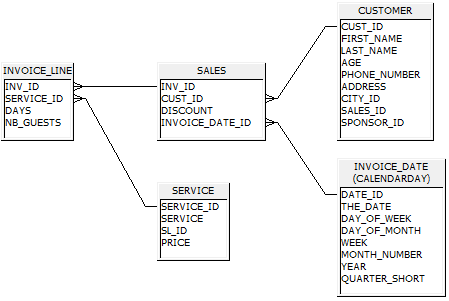
The universe database structure is the following:

The universe contains the following objects:

  • Revenue defined as SUM(INVOICE_LINE.DAYS * INVOICE_LINE.NB_GUESTS * SERVICE.PRICE)
  • Invoice Date objects such as Invoice Date, Month, Quarter, Year.
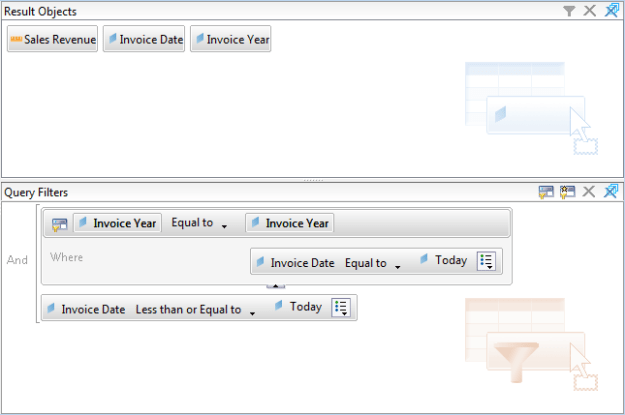
  • Today object defined as SYSDATE (Oracle).

The task can be solved with the following query in Web Intelligence:

The generated SQL is:

SELECT
  SUM(INVOICE_LINE.DAYS * INVOICE_LINE.NB_GUESTS * SERVICE.PRICE),
  INVOICE_DATE.THE_DATE,
  INVOICE_DATE.YEAR
FROM
  SERVICE INNER JOIN INVOICE_LINE 
  ON (INVOICE_LINE.SERVICE_ID=SERVICE.SERVICE_ID)
  INNER JOIN SALES ON (INVOICE_LINE.INV_ID=SALES.INV_ID)
  INNER JOIN CALENDARDAY  INVOICE_DATE 
  ON (SALES.INVOICE_DATE_ID=INVOICE_DATE.DATE_ID)  
WHERE
  (
   INVOICE_DATE.YEAR  =  ANY 
     (
     SELECT
       INVOICE_DATE.YEAR
     FROM
       CALENDARDAY  INVOICE_DATE
     WHERE
       INVOICE_DATE.THE_DATE  =  SYSDATE
     )
   AND
   INVOICE_DATE.THE_DATE  <=  SYSDATE
  )
GROUP BY
  INVOICE_DATE.THE_DATE, 
  INVOICE_DATE.YEAR

How to Change Expression in Report Cells using BO Java SDK

Problem

“I have nearly 500 reports, each report having logo on the right up corner in all tabs, in a cell having formula “boimg://logo.bmp” and read as image URL. Now i have come up with change in logo format. Now the same formula is to be changed to “boimg://logo.jpg””.

Code

private static int replaceExpression(DocumentInstance widoc, String from, String to) {
   ReportDictionary reportDictionary = widoc.getDictionary();
   ArrayList nodes = getListOfTreeNodes(widoc.getStructure(), false);
   int n = 0;
   for (TreeNode node : nodes) {
      if (node instanceof ReportCell) {
         ReportCell reportCell = (ReportCell)node;
         ReportExpression reportExpression = reportCell.getExpr();
         if (reportExpression instanceof FormulaExpression) {
            FormulaExpression formulaExpression = (FormulaExpression)reportExpression;
            if (formulaExpression.getValue().compareTo(from) == 0){
               FormulaExpression newFormulaExpression = reportDictionary.createFormula(to);
               reportCell.setExpr(newFormulaExpression);
               n += 1;
            }
         }
      }
   }
   widoc.applyFormat();
   return n;
}

public static ArrayList getListOfTreeNodes(TreeNode root, boolean onlyLeaves) {
   ArrayList nodes = new ArrayList();
   treeNodeTraversal(root, nodes, onlyLeaves);
   return nodes;
}

private static void treeNodeTraversal(TreeNode node, ArrayList nodes, boolean onlyLeaves) {
   if (!onlyLeaves || node.isLeaf()) {
      nodes.add(node);
   }
   for (int i = 0; i < node.getChildCount(); ++i) {
      treeNodeTraversal(node.getChildAt(i), nodes, onlyLeaves);
   }
}

Source

https://bukhantsov.org/tools/ReplaceInReportCell.java

How to get report drill filters

Here is an example how to get report drill filters.

DocumentInstance doc = reportEngine.openDocument(infoObject.getID());
Reports reports = doc.getReports();
for (int i = 0; i < reports.getCount(); i++)
{
    Report report = reports.getItem(i);
    DrillInfo drillInfo = (DrillInfo) report.getNamedInterface("DrillInfo");
    DrillBar drillBar = drillInfo.getDrillBar();
    for (int j = 0; j < drillBar.getCount(); ++j) {
        DrillBarObject drillBarObject = drillBar.getItem(j);
        System.out.println(
            String.format("%s='%s'", 
                drillBarObject.getName(), 
                drillBarObject.getFilter()));
    }
}
doc.closeDocument();

Result:

Service Line='Recreation'
Year=''

How to Test All Connection using BusinessObjects SDK

Problem

“I was doing some research in the past but could not find any solution out on the WEB, but think it would be helpful for BO admins. Tool, that can test all the universe connection from environment without using Designer tool, since in it you can test one connection at the time, but if you have 50 of them that is a lot of clicks. In our company , we often change database passwords and need to update connections setting, and sometimes we can miss 1-2 and few days later some reports will start failing or people will complain that they can run certain report (because database password was not been updated). So I was thinking about some utility that can use designer SDK that can go and loop through all the universe connections in the system and return pass or fail.”

Code

static void Main(string[] args)
{
   Application application = new Application();
   try
   {
      if (args.Length != 4)
      {
         application.LogonDialog();
      }

      Connections connections = application.Connections;
      foreach (Connection connection in connections)
      {
         Console.Write(connection.Name.PadRight(40));
         try
         {
            connection.Test();
            Console.WriteLine("OK");
         }
         catch (Exception ex)
         {
            Console.WriteLine(ex.Message.Replace("\n","").Replace("\r",""));
         }
      }
   }
   catch (Exception ex)
   {
      Console.WriteLine(ex.ToString());
   }
   finally
   {
      application.Quit();
   }
}

Downloads

download source Source
download executable Executable for BOE XI 3.1 SP3 FP3.2

The executable should be run from command line as the result is printed to standard output. The arguments are: username password server auth. E.g.

TestConnections.exe Administrator "" localhost secEnterprise > c:/connectionstest.txt

If you do not specify the arguments, the designer logon dialog will appear.

Crystal Reports vs Web Intelligence

Crystal Reports and Web Intelligence are two technologies from SAP BusinessObjects portfolio that provide possibility to build reports. Web Intelligence is a perfect tool for ad-hoc reporting. It is very easy to build report from a scratch even for a new user. However when the requirements are too specific, when it is necessary to build in a sophisticated logic or when a precise formatting is required, the simplicity becomes too restrictive and the reports turn into a terrible mix of miscellaneous tricks. In this situation, Crystal Reports is much better choice. Below is a technical comparison of Crystal Reports and Web Intelligence written by my colleague Maria Ruchko, an expert in both these technologies.

Crystal Reports

Web Intelligence

Data Source Crystal Reports can use universes or access a database directly. Some advanced features of universes (such as contexts) are disabled in Crystal. Database Direct connection and Universe cannot be used together. Web Intelligence can only use universes.
Prompts Report data not necessarily must be filtered by the prompt value. Prompts’ Lists of Values can be defined in the report. Default value can be calculated. Prompts within reports must be used for filtration of data (this restriction can be overcome but some tricks must be used). Lists of values are based on the database values. Customized or calculated lists of values require placing prompt into Universe (which means universe customization). Default value cannot be calculated. Current Date cannot be set as default in Date prompt.
Layout Many tools are available for work with layout  (rulers, guidelines). It is also very flexible because formulas can be used for determining position of the fields, suppression of rows etc. Especially good for working with single table reports. If report has more than one table, subreports must be used which might affect performance Web Intelligence is not flexible and it is difficult (sometimes impossible) to get precise layout, very difficult to get flexibility based on parameters (e.g. showing dynamic number of columns). Not a problem to place more than one table within the report.
Development Crystal Reports Designer license and Crystal Reports Writer are required to develop and modify reports. Reports can be developed or modified using Infoview or Webi Rich Client.
Viewing Reports can be viewed and scheduled in Infoview Reports can be viewed and scheduled in Infoview
Development Time It takes longer to develop simple report in Crystal Reports than Web Intelligence, but complex reports development time is more predictable (no need to invent tricks). It is easier to implement complex logic. Simple reports can be developed on fly if there is an intuitive universe. It takes a lot of time to develop a report based on a complex universe (to overcome restrictions of the tool). For complex reports it is sometimes easier to develop a customized universe specially for the report and put all logic in this universe.
Users Office employees who have to report in the same form (with some deviations which can be handled by parameters) or management for some standard reports or analytical reports (if manager’s are not technically qualified to build Webi reports or universe is too complex for understanding) Top management and executives, who use report for decision making (not for daily scheduled standard reports), want to make ad-hoc analysis, dig into data and decide what data they prefer to see in the report when they build it.
Notifications Crystal Reports can send an e-mail to users based on alerts, when report data meets some condition (e.g. if profit less than 0) The similar option is not available
Export formats XLS, PDF, CSV, TTX, RTF, HTML, XML XLS, PDF, CSV
Upgrade and recovery If a report is based on database directly (not using universe), upgrade can affect report only if database structure was changed. It is easy to remap fields though, which means that report can be recovered anyway. Universe changes may affect a report if an object used by the report is deleted. Sometimes it can be difficult or impossible to recover reports if the original universe was modified or removed by mistake.

Printing LoV names with Designer COM SDK

Tutorial “Getting started with Designer SDK”

using System;
using Designer;
namespace ConsoleApplication1
{
    class Program
    {
        delegate void CleanUpMethod();

        static void Main(string[] args)
        {
            Application application = new Application();
            application.Interactive = false;

            CleanUpMethod cleanUp = delegate { application.Quit(); };
            Console.CancelKeyPress += delegate { cleanUp(); }; // to handle Ctrl+C

            try
            {
                application.Logon("Administrator", 
                    "", "localhost", "secEnterprise");                
                Universe universe =
                    application.Universes.OpenFromEnterprise(
                        "webi universes",
                        "Island Resorts Marketing",
                        false);
                PrintClasses(universe.Classes, "");
                universe.Close();
            }
            catch (Exception ex)
            {
                Console.WriteLine(ex.ToString());
            }
            finally
            {
                cleanUp();
            }
        }

        static void PrintClasses(Classes classes, String path)
        {
            foreach (Class theclass in classes)
            {
                String path2 = path + "/" + theclass.Name;
                foreach (Designer.Object theobject in theclass.Objects)
                {
                    if (theobject.HasListOfValues)
                    {
                        Console.WriteLine(path2 + ";" 
                            + theobject.Name + ";" 
                            + theobject.ListOfValues.Name);
                    }
                }
                PrintClasses(theclass.Classes, path2);
            }
        }

    }
}