Category Archives: Business Objects

BusinessObjects

Alerters & Drilling in Webi

It is not possible to use variables as drill object in Webi reports. Here is a clever trick how to overcome this limitation using alerters:

http://deltekbpm.blogspot.dk/2013/03/be-alert-part-1-to-drill-or-not-to-drill.html

The idea is to define a variable that calculates the drill level using the function DrillFilter() and then to use this variable in alerters to “overwrite” the value of the drill object with the value of the desired variable.

How to run a webi document and export the result to PDF, Excel etc using BO Java Report Engine SDK

This post describes the typical code required to run a Webi document and export the result to PDF, Excel, CSV or XML file. Here is the compete code .

The workflow is the following

  1. Open a webi document
  2. Run queries
  3. Set prompts and contexts
  4. Export
  5. Close

The important is that the queries should be run before setting the prompts.

Open a Webi document

Let’s assume that we found an Id of  Webi document.

DocumentInstance doc = reportEngine.openDocument(infoObject.getID());

Run queries

The queries can be run using DocumentInstance.refresh() or DataProviders.runQueries().

doc.refresh();

Prepare answers to prompts

It is convenient to create a map that for each prompt provides a set of values, and later use this map to enter the prompts.

HashMap<String, String[]> answers = new HashMap<String, String[]>();
answers.put("Country:", new String[]{"US", "France"});
answers.put("Year:", new String[]{"FY2004"});

(Here we assume that the document has two prompts “Country:” and “Year:”.)

Enter the prompts values

For each prompt, the code looks up the values in the map, enters the values using Prompt.enterValues().

After that, it sets the prompts using DocumentInstance.setPrompts(). At this point, if all mandatory prompts are set, the document is be refreshed.

Note that you can get name of the report in two ways. Prompt.getID() return original name and Prompt.getName() returns localized name (if there are translations for the document).

Prompts prompts = doc.getPrompts();
for (int i = 0; i < prompts.getCount(); i++) {
    Prompt prompt = prompts.getItem(i);
    String[] answer = answers.get(prompt.getID());
    if (answer != null) {        
        prompt.enterValues(answer);
    }
}
doc.setPrompts();

Check if the document has been refreshed

If there are mandatory prompts that are not answered, setPrompts() will not refresh document. If so we print error message.

if (doc.getMustFillPrompts()) {
    System.out.println("ERROR: Mandatory prompts has not been entered");
}

Also it is possible that there are multiple contexts and one need to be selected in order to run the document. In most cases the documents are designed to avoid prompting about contexts, so here we assume that there is no need to select one. But just in case, we check this also.

if (doc.getMustFillContexts()) {
    System.out.println("ERROR: Context has not been selected");
}

Export to PDF

We can export complete document, a report of the document, or data providers.

For instance to export the document to PDF, we can get view in the PDF format and write the contents to a file.

BinaryView binaryView2 = (BinaryView)doc.getView(OutputFormatType.PDF); 
String title = infoObject.getTitle();
writeBytes(binaryView2.getContent(), title + ".pdf");

Here we use an auxiliary function that writes byte array to a file.

public static void writeBytes(byte[] data, String filename) throws IOException {
    File file = new File(filename); 
    FileOutputStream fstream = new FileOutputStream(file); 
    fstream.write(data); 
    fstream.close();
}

Export to Excel

We can export the document to an Excel file using similar code:

BinaryView xlsView = (BinaryView)doc.getView(OutputFormatType.XLS);
writeBytes(xlsView.getContent(), title + ".xls");

There are two types of Excel output format type, OutputFormatType.XLS is optimized for presentation and OutputFormatType.XLSDataCentric is optimized for data manipulation.

Export to CSV

We can export data from one or all data providers to a CSV file:

CSVView csvView = (CSVView)doc.getDataProviders().getView(OutputFormatType.CSV);
writeBytes(csvView.getContent().getBytes(), title + ".csv");

BinaryView.getContent() returns content as byte array, while CSVView.getContent() returns String. Therefore we use String.getBytes() to adhere the function writeBytes().

Export to HTML

It is also possible to export each report of the document individually for instance to a HTML files. In this case you need to change pagination mode to listing otherwise you can get partial result.

Reports reports = doc.getReports();
for (int i = 0; i < reports.getCount(); i++)
{
    Report report = reports.getItem(i);
    report.setPaginationMode(PaginationMode.Listing);
    HTMLView htmlView = (HTMLView) report.getView(OutputFormatType.DHTML);
    writeBytes(htmlView.getContent().getBytes(), title + " " + i + ".html");
}

Done

That is it.

doc.closeDocument();

How to determine date pattern for a Webi document using Java RE SDK

...

// Determine preferred locale for the user
Locale locale = null;
try {
    IUserInfo userInfo;
    try {
        userInfo = enterpriseSession.getUserInfo();
    }
    catch (SDKException e) {
        userInfo = null;
    }
    if (null != userInfo) {
        try {
            if (userInfo.getPreferredViewingLocale() != null) {
                locale = userInfo.getPreferredViewingLocale();
            }
        }
        catch (SDKException.PropertyNotFound e) {
            locale = Locale.getDefault();
        }
    }
    System.out.println("Locale: " + locale);
}
catch(Exception e) {
    System.out.println(e.toString());
}
if (locale != null) {
    // Open the document
    OpenDocumentParameters odp = new OpenDocumentParameters(-1, true, false);
    odp.getMultilingualOptions().enableMultilingual(locale.toString());
    DocumentInstance doc = reportEngine.openDocument(infoObject.getID(), odp);

    // Determine the pattern
    FormatNumber formatNumber = doc.getDefaultFormatNumber(FormatNumberType.DATE_TIME);
    System.out.println("Date pattern: " + formatNumber.getPositive());

    // Close the document
    doc.closeDocument();
}

How to refresh Deski report and export it as PDF and XLS using COM SDK

Here is an example how to open Deski report and refresh it and export as PDF using COM SDK.

You will need Visual Studio 2010 Express, BusinessObjects Enterprise XI 3.1 client tools.

1) Create a Deski report (here C:\Users\dmytro\Desktop\Document1.rep)
2) Create a new Project “RunDeski” in VS
3) Add reference to the Deski COM SDK, Project > Add Reference > BusinessObjects 12.0 Object Library
4) Paste the code.
5) Run it.

using busobj;
namespace RunDeski
{
    class Program
    {
        static void Main(string[] args)
        {
            Application application = new Application();
            try 
            {
                application.Interactive = false;
                application.Logon("Administrator", "", "localhost", "secEnterprise", false, true);
                IDocument doc = application.Documents.Open(@"C:\Users\dmytro\Desktop\Document1.rep");
                doc.Refresh();
                doc.ExportAsPDF(@"C:\Users\dmytro\Desktop\Document1.pdf"); 
                doc.SaveAs(@"C:\Users\dmytro\Desktop\Document1.xls");
                doc.Close();
            }
            catch (Exception e)
            {
                Console.WriteLine(e.ToString());
            }
            finally
            {
                application.Quit();
            }
        }
    }
}

Purge or Refresh Universe Lists of Values from Command Line

The command line tool imports a universe from CMS, refreshes or purges lists of values (LoVs) and exports the universe back to CMS.

Downloads

Executable for BOE XI 3.1

Source – C# VS 2010 Express solution

This software is distributed AS IS with no warranty of any kind, use it on your own risk.

Options

/server: – BO server. If not specified, standalone mode will be used.
/user: – User name. Default – “Administrator”
/password: – password. Default – blank
/auth: – Authentication. Default – “secEnterprise”
/cmsfolder: – CMS folder with universe
/cmsuniverse: – Universe name in CMS
/file: – Local file name
/lovs: – File with list of values. Only specified LoVs will be purged/refreshed.
/purge – Purge all lists of values
/refresh – Refresh all lists of values
/save – Save all lists of values to a file

The tool can purge or refresh LoVs.

server, user, password and auth are the connection parameters. The tool can also run in standalone mode, that is when server is not specified.

When cmsfolder and cmsuniverse are specified, the tool will import the universe, handle lists of values and export it back to CMS.

The tool can work with locally saved universe using option file. In this case the tool will open the universe, handle LoVs and save it to the same location.

The tool can proceed only subset of lists of values using lovs option which is the name of the file. To build the file with all LoVs, the option save should be used.

Example

Build a list of all lists of values and save to a file lovs.txt

LovUtil.exe /server:localhost /cmsfolder:"test examples" /cmsuniverse:Univers1  lovs:lovs.txt /save

Refresh lists of values specified in the file lovs.txt

LovUtil.exe /server:localhost /cmsfolder:"test examples" /cmsuniverse:Univers1 /lovs:lovs.txt /refresh

Refresh all lists of values for a locally saved file in standalone mode

LovUtil.exe /file:"Univers1.unv" /refresh

Join and Synchronization in Web Intelligence

When objects are merged in a Webi document there are two possible types of the merge operation: join and synchronization. The type depends on the objects selected in a data block. To achieve expectable result, it is important to understand the difference between these operations.

Let’s consider examples of each operation.

Join

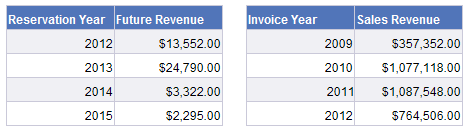
The document use two data providers. The first data provider (Reservation) has Reservation Year, Future Revenue.

The second data provider (Sales) has Invoice Year, Sales Revenue.

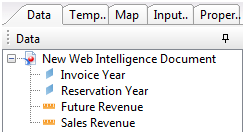
The list of objects in the document contains these 4 objects:

Here are the corresponding tables in the report:

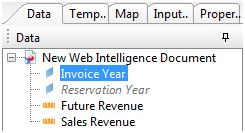
We cannot use both dimensions in the same data block. If we pick one, the other is grayed. The reason for that is that BO does not know how to combine the dimensions from different data providers. It is not obvious for BO that they have the same nature (year).

To tell BO that these dimensions have the same business meaning, and that we want to merge them in the report, we need to merge the dimensions.

We merge the Invoice Year and Reservation Year.

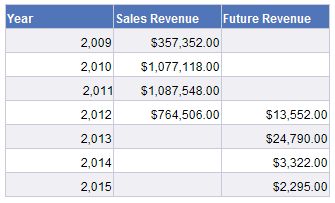
Now we can pick Year, Sales Revenue, Future Revenue in the same table.

The values of Year are the union of Invoice Year and Reservation Year values.

Note that if we pick only measure from one data provider, all years will be displayed.

Synchronization

Let’s add Sales Person to the second data provider:

The table has not changed:

If we add Sales Person to the table, there will be significant change than just adding one dimension:

  • Now the merged dimension is showing only values of Invoice Year.
  • Sales Revenue is also split by Sales Person.
  • Future Revenue is also split by Sales Person. Instead the total Future Revenue for 2012 is shown for each Sales Person for 2012.

(Note that blank values here correspond to nulls. Null is just a normal value.)

The data in the two data providers has different granularity. It is not possible to calculate Future Revenue for a specific sales person as this granularity is not available in the Reservation data provider. Therefore BO shows total for 2012 for each Sales Person in 2012.

The years for which only Reservations exist are also not displayed. It is not possible to show them as the granularity of Reservations is lower than granularity of Sales. They cannot be added with blank in the column for Sales Person. Here the blank value means that there is no sales person. But sales person is just not relevant for Reservations. (OK, in general the sales person is relevant to reservations, but according to the data providers, he is not)

This demonstrates two types of operations: Join and Synchronization. The operation depends on the dimensions selected to the data block, it does not depend on measures and details.

Two data providers are joined if only merged dimensions are selected to the data block. All combinations of dimensions from the first data provider are united with all combinations of dimensions from the second data provider. The measures are projected in the context of the merged dimensions. The details are looked up by the matching dimensions.

Two data providers are synchronized if beside the merged dimensions, one or more non-merged dimension is used in the data block. All non-merged dimensions should be from the same data provider. Let’s call this data provider the leading data provider. All combinations of dimensions from the leading data provider are displayed in the data block. The measures from the secondary data provider are projected in context of dimensions from the secondary data provider and looked up by the matching merged dimensions.

(There can be more than two data providers involved)

Query

We considered two separate data providers. The operations join and synchronization are possible for a single data provider on a query level.

When we pick objects from the different contexts they are synchronized or joined on the query level.

For instance Future Revenue and Sales Revenue come from different contexts. Service is a common dimension (here, the common dimension is analogue of the merged dimension):

Therefore the queries are joined (note “Join” in the root):

The data provider with a joined queries acts as a data provider with a single query.

When beside the common dimensions, there is a dimension that does not belongs to all contexts, the queries are synchronized.

The synchronized queries are not actually synchronized when creating the data provider. The operation will be chosen by the dimensions selected in the data block. If only the common objects are used, the queries will be joined.

For instance, here you see result of the join operation, even though the synchronization operation was displayed for queries:


How to print SQL queries of Webi 4.0 document using Java

The current public BO BI 4.0 SDK does not include functionality that allows to print SQL queries of a Webi 4.0 document, but this is still possible.

UPDATE: BO BI 4.1 SDK contains RESTful web services for Webi. It allows you to do the below without hacks.

Disclaimer: Use it on your own risk.

The necessary libraries:

  • C:\Program Files (x86)\SAP BusinessObjects\Tomcat6\webapps\BOE\WEB-INF\eclipse\plugins\webpath.AnalyticalReporting\web\WEB-INF\lib\adv_ivcdzview.jar
  • C:\Program Files (x86)\SAP BusinessObjects\Tomcat6\webapps\BOE\WEB-INF\eclipse\plugins\webpath.AnalyticalReporting\web\WEB-INF\lib\webi_client_toolkit.jar
  • C:\Program Files (x86)\SAP BusinessObjects\SAP BusinessObjects Enterprise XI 4.0\java\lib\*
    (without subfolders)

The program has two classes: Program and Processor. Program is a main class that iterates through infoobjects of Webi type. Processor is printing SQL of the Webi documents. The most interesting part is Processor which uses BI 4.0 functionality for accessing data providers.

Main (Program.java)

import com.crystaldecisions.sdk.exception.SDKException;
import com.crystaldecisions.sdk.framework.CrystalEnterprise;
import com.crystaldecisions.sdk.framework.IEnterpriseSession;
import com.crystaldecisions.sdk.framework.ISessionMgr;
import com.crystaldecisions.sdk.occa.infostore.IInfoObject;
import com.crystaldecisions.sdk.occa.infostore.IInfoObjects;
import com.crystaldecisions.sdk.occa.infostore.IInfoStore;

public class Program {
   public static void main(String[] args) throws Exception {

      IEnterpriseSession enterpriseSession = null;
      try {
         // Establish connection
         System.out.println("Connecting...");
         ISessionMgr sessionMgr = CrystalEnterprise.getSessionMgr();
         enterpriseSession = sessionMgr.logon(
               "Administrator", "", "localhost", "secEnterprise");
         IInfoStore infoStore = (IInfoStore) enterpriseSession.getService("InfoStore");

         // Initialize processor (see below)
         Processor processor = new Processor(enterpriseSession);

         // Get list of Webi documents
         String cmsQuery = "select SI_NAME, SI_ID from CI_INFOOBJECTS "
               + "where SI_KIND = 'Webi' and SI_INSTANCE=0";
         IInfoObjects infoObjects = (IInfoObjects) infoStore.query(cmsQuery);

         // Process all Webi documents from a folder (root here)
         for (Object object : infoObjects) {
            IInfoObject infoObject = (IInfoObject) object;
            String path = getInfoObjectPathAndTitle(infoObject); 
            if (path.startsWith("/")) {
               System.out.println(path);
               processor.process(infoObject);
               System.out.println();
            }
         }
      } catch (SDKException ex) {
         ex.printStackTrace();
      } finally {
         if (enterpriseSession != null)
            enterpriseSession.logoff();
      }
      System.out.println("Finished!");
   }

   public static String getInfoObjectPath(IInfoObject infoObject) throws SDKException {
      String path = "";
      while (infoObject.getParentID() != 0) {
         infoObject = infoObject.getParent();
         path = "/" + infoObject.getTitle() + path;
      }
      return path;
   }

   public static String getInfoObjectPathAndTitle(IInfoObject infoObject) throws SDKException {
      return getInfoObjectPath(infoObject) + "/" + infoObject.getTitle();
   }
}

Printing (Processor.java)

import java.util.List;
import java.util.Locale;

import com.businessobjects.adv_ivcdzview.Utils;
import com.businessobjects.rebean.wi.model.engine.IDocumentInstance;
import com.businessobjects.rebean.wi.services.IDocumentInstanceManagementService;
import com.businessobjects.rebean.wi.services.IDocumentInstanceService;
import com.businessobjects.sdk.core.Core;
import com.businessobjects.sdk.core.context.IContext;
import com.crystaldecisions.sdk.exception.SDKException;
import com.crystaldecisions.sdk.framework.IEnterpriseSession;
import com.crystaldecisions.sdk.occa.infostore.IInfoObject;
import com.sap.sl.dataprovider.DataProvider;
import com.sap.sl.dataprovider.service.DataProviderService;
import com.sap.sl.queryexecutionplan.NativeQueryNode;
import com.sap.sl.queryexecutionplan.OperatorNode;
import com.sap.sl.queryexecutionplan.QueryExecutionPlan;
import com.sap.sl.queryexecutionplan.QueryExecutionPlanNode;
import com.sap.sl.sdk.workspace.service.WorkspaceContextualService;
import com.sap.sl.workspace.Workspace;
import com.sap.sl.workspace.service.WorkspaceService;
import com.sap.webi.client.toolkit.Deployment;
import com.sap.webi.client.toolkit.LoginKey;
import com.sap.webi.client.toolkit.SessionContext;
import com.sap.webi.client.toolkit.services.DSLServicesHelper;
import com.sap.webi.client.toolkit.services.ServicesHelper;

public class Processor {

   SessionContext sessionContext;
   Locale localLocale;
   IContext context;
   IDocumentInstanceManagementService dimService;
   IDocumentInstanceService diService;
   DataProviderService dpService;
   WorkspaceService wsService;

   public Processor(IEnterpriseSession enterpriseSession) throws SDKException {
      sessionContext = Utils.getSessionContextManager()
            .matchSessionContext(Deployment.DHTML, 
                  enterpriseSession.getSerializedSession(), true);

      localLocale = Locale.getDefault();
      sessionContext.getLoginInfo().set(LoginKey.LOCALE, localLocale);
      sessionContext.logonWithSerializedSession();

      context = sessionContext.getCoreContext();         
      dimService = Core.getService(IDocumentInstanceManagementService.class);
      diService = ServicesHelper.getDocumentInstanceService();

      dpService = DSLServicesHelper.getDataProviderService(context);
      wsService =  Core.getService(WorkspaceContextualService.class, context);
   }

   public void process(IInfoObject infoObject) {
      IDocumentInstance doc = dimService.openDocument(context, infoObject.getID());               
      Workspace workspace = diService.getWorkspace(context, doc);            
      List<DataProvider> listDataProvider = wsService.getDataProviders(workspace); 
      for (DataProvider provider : listDataProvider) {
         QueryExecutionPlan plan = dpService.getQueryExecutionPlan(provider, true);
         print(plan.getQueryExecPlanTree());
      }
      dimService.closeDocument(context, doc);
   }

   private static void print(QueryExecutionPlanNode planNode) {
      if (planNode instanceof NativeQueryNode) {
         NativeQueryNode queryNode = (NativeQueryNode)planNode;
         System.out.println(queryNode.getNativeQueryString());         
      } else if (planNode instanceof OperatorNode) {
         OperatorNode operatorNode = (OperatorNode)planNode;      
         for (QueryExecutionPlanNode node : operatorNode.getChildren()) {
            print(node);
         }
      }
   }
}

Java code to list the objects used in a Webi 4.0 document

The current public BO BI 4.0 SDK does not include any features that allows to list objects used in a Webi 4.0 document or access variables. But this is still possible.

UPDATE: Please consider 4.1 RESTful Web Services SDK Developer Guides and API References http://scn.sap.com/docs/DOC-27465. It might be more convenient than hacking internal SDKs.

The necessary libraries:

  • C:\Program Files (x86)\SAP BusinessObjects\Tomcat6\webapps\BOE\WEB-INF\eclipse\plugins\webpath.AnalyticalReporting\web\WEB-INF\lib\adv_ivcdzview.jar
  • C:\Program Files (x86)\SAP BusinessObjects\Tomcat6\webapps\BOE\WEB-INF\eclipse\plugins\webpath.AnalyticalReporting\web\WEB-INF\lib\webi_client_toolkit.jar
  • C:\Program Files (x86)\SAP BusinessObjects\SAP BusinessObjects Enterprise XI 4.0\java\lib\* (without subfolders)
Disclaimer: Use it on your own risk
import java.util.List;
import java.util.Locale;

import com.businessobjects.adv_ivcdzview.Utils;
import com.businessobjects.rebean.wi.model.engine.IDocumentInstance;
import com.businessobjects.rebean.wi.services.IDocumentInstanceManagementService;
import com.businessobjects.sdk.core.Core;
import com.businessobjects.sdk.core.context.IContext;
import com.crystaldecisions.sdk.exception.SDKException;
import com.crystaldecisions.sdk.framework.CrystalEnterprise;
import com.crystaldecisions.sdk.framework.IEnterpriseSession;
import com.crystaldecisions.sdk.framework.ISessionMgr;
import com.crystaldecisions.sdk.occa.infostore.IInfoObject;
import com.crystaldecisions.sdk.occa.infostore.IInfoObjects;
import com.crystaldecisions.sdk.occa.infostore.IInfoStore;
import com.sap.sl.dictionary.DictionaryExpression;
import com.sap.sl.dictionary.Variable;
import com.sap.webi.client.toolkit.Deployment;
import com.sap.webi.client.toolkit.LoginKey;
import com.sap.webi.client.toolkit.SessionContext;
import com.sap.webi.client.toolkit.reporting.ReportDictionaryHelper;

public class Program2 {
  public static void main(String[] args) throws Exception {

    IEnterpriseSession enterpriseSession = null;
    try {
      System.out.println("Connecting...");
      ISessionMgr sessionMgr = CrystalEnterprise.getSessionMgr();
      enterpriseSession = sessionMgr.logon(
          "Administrator", "", "localhost", "secEnterprise");

      // Do some magic
      String serializedSession = enterpriseSession.getSerializedSession();
      SessionContext sessionContext = Utils.getSessionContextManager()
          .matchSessionContext(Deployment.DHTML, serializedSession, true);
      Locale localLocale = Locale.getDefault();
      sessionContext.getLoginInfo().set(LoginKey.LOCALE, localLocale);
      sessionContext.logonWithSerializedSession();
      IContext context = sessionContext.getCoreContext();
      IDocumentInstanceManagementService documentInstanceManagementService =
          Core.getService(IDocumentInstanceManagementService.class);

      // Get the list of webi documents
      IInfoStore infoStore = (IInfoStore) enterpriseSession.getService("InfoStore");
      String query = "select SI_NAME, SI_ID from CI_INFOOBJECTS "
          + "where SI_KIND = 'Webi' and SI_INSTANCE=0";
      IInfoObjects infoObjects = (IInfoObjects) infoStore.query(query);

      for (Object object : infoObjects) {
        IInfoObject infoObject = (IInfoObject) object;
        if (getInfoObjectPathAndTitle(infoObject).startsWith("/")) {
          System.out.println("REPORT: " + infoObject.getTitle());

          IDocumentInstance doc = documentInstanceManagementService
              .openDocument(context, infoObject.getID());

          List list = ReportDictionaryHelper
              .getDictionaryObjectsFlatList(context, doc);
          if (list.size() > 0) {
            System.out.println("OBJECTS:");
            for (DictionaryExpression expr:list) {
              System.out.println(expr.getName());
            }
          }

          List vars = ReportDictionaryHelper.getDocumentVariables(context,doc);
          if (vars.size() > 0) {
            System.out.println("VARIABLES:");
            for (Variable var:vars) {
              System.out.println(var.getName());
            }
          }

          documentInstanceManagementService.closeDocument(context, doc);
          System.out.println();
        }
      }
    } catch (SDKException ex) {
      ex.printStackTrace();
    } finally {
      if (enterpriseSession != null)
        enterpriseSession.logoff();
    }
    System.out.println("Finished!");
  }

  public static String getInfoObjectPath(IInfoObject infoObject)
      throws SDKException
  {
    String path = "";
    while (infoObject.getParentID() != 0) {
      infoObject = infoObject.getParent();
      path = "/" + infoObject.getTitle() + path;
    }
    return path;
  }

  public static String getInfoObjectPathAndTitle(IInfoObject infoObject)
      throws SDKException
  {
    return getInfoObjectPath(infoObject) + "/" + infoObject.getTitle();
  }
}

Hack of Webi prompts

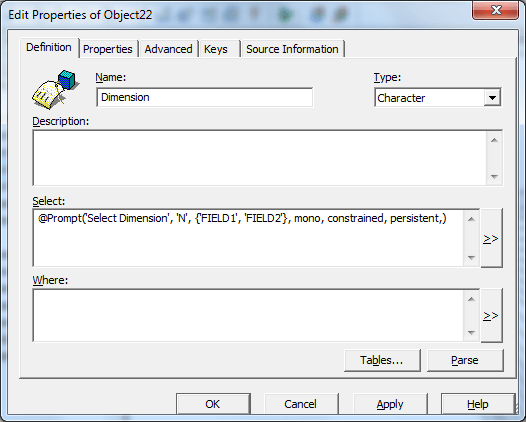
Prompts can be used to select a value from the list of values. What about selecting a field from a list of fields? Say you have FIELD1 and FIELD2 in SOMETABLE. You want to display FIELD1 or FIELD2 depending on the user answer. You can write a long select using CASE WHEN, but that is not interesting. Here is a dirty hack 🙂

Create an object with select:

@Prompt('Select Dimension ', 'N', {'FIELD1', 'FIELD2'}, mono, constrained, persistent,)

Select SOMETABLE in the property Tables.

‘N’ is used as prompt type. This means that the values in the LoV are supposed to be numeric, so BO will unquote the selected value generating SQL.

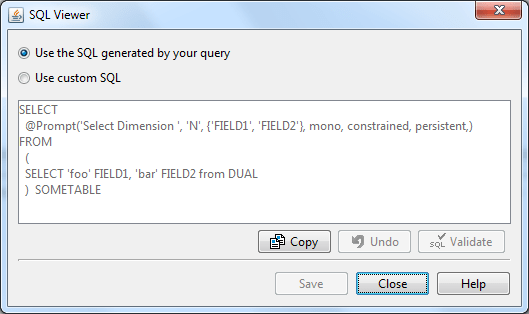
Let’s try this in a report. Pick the object, and check the generated SQL:

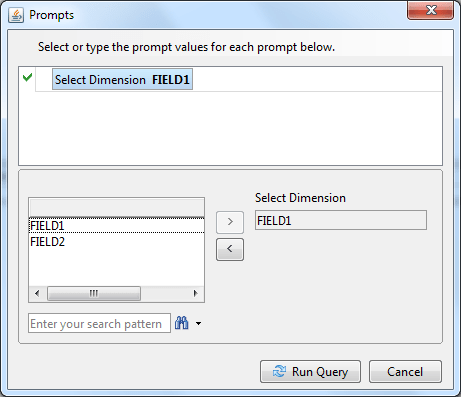
When you run report, you will get a prompt:

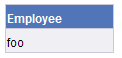
You will see ‘foo’ in the report (which is the value of the field FIELD1)

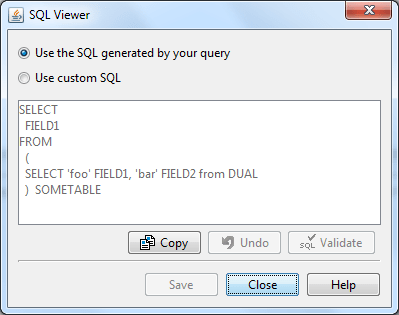
The generated SQL:

Command line InfoStore Query Builder with export to Excel

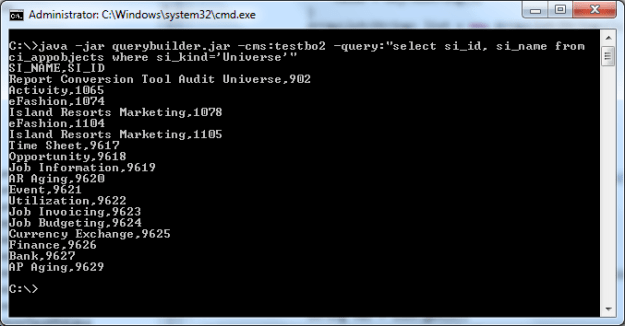
A free command line tool that runs query against CMS database and saves the result in Excel or CSV.

Options

-cms: BO server. Default is localhost
-username: BO user name. Default is Administrator
-password: User password. Default is blank
-auth: Authentification. Default is secEnterprise

-query: CMS query (the same as you run in Query Builder). See example.
-file: CMS query will be read from the file.
You should either specify -query: or -file: but not both.

-excel: Output excel file name. It will contain two spreadsheets: one for simple properties
and another for containers. See containers.
-csv: Output cvs file for simple properties. See containers.
-csv2: Output cvs file for containers properties. See containers.
If neither -excel: nor -csv: are specified, the simple properties will be printed to the standard output in CSV format.

Example

java -jar querybuilder.jar -query:"select si_name from ci_infoobjects"

Containers

There are simple properties of CMS objects e.g. SI_ID, SI_NAME, and containers – properties that have subproperties. For instance, the property SI_PROMPTS has subproperties SI_NUM_PROMPTS, SI_PROMPT1, SI_PROMPT2 etc. In turn SI_PROMPT1 has subproperties: SI_PROMPT, SI_PROMPT_TYPE, SI_OPTIONS etc. The containers are exported in the form: infoobject id, infoobject title, property path, property value.

Download

The tool has been desupported. Check Biclever CMS Query Builder.