Use of Index and Characterset

This post demonstrates influence of characterset on use of indexes. See also Language and Use of Indexes in Oracle

/*
DROP TABLE t;
ALTER SESSION SET NLS_LANGUAGE='AMERICAN';
*/

SELECT PARAMETER, VALUE FROM V$NLS_PARAMETERS;

CREATE TABLE t (x VARCHAR2(255));

INSERT INTO t VALUES ('a');
INSERT INTO t VALUES ('b');
INSERT INTO t VALUES ('c');
INSERT INTO t VALUES ('d');

CREATE INDEX t_idx ON t (x);

-- the index is used
UPDATE t SET x='a' WHERE x='a';

ALTER SESSION SET NLS_LANGUAGE='CZECH';

-- the index is still used if NLS_CHARACTERSET=WE8MSWIN1252
-- the index is not used if NLS_CHARACTERSET=WE8ISO8859P1
UPDATE t SET x='a' WHERE x='a';

Language and Use of Indexes in Oracle

Symptoms

It takes a very long time to load a data warehouse on Oracle database with Kettle when the language in the Windows Region and Language settings is different from English (United States).

Cause

  • Oracle JDBC driver used by Kettle issues command ALTER SESSION SET NLS_LANGUAGE and changes default database language.
  • Changing NLS_LANGUAGE also changes oracle parameter NLS_SORT from BINARY to the specified language.
  • When NLS_COMP is equal to ANSI and the value of NLS_SORT is not BINARY, the linguistic comparison is used for WHERE statements.
  • When the value of NLS_COMP is different from BINARY a full scan is used for VARCHAR2 fields instead of index range scan.

Resolution

Add “-Duser.country=en -Duser.language=en” to java runtime options in Kettle batch files.

Experiment

When NLS_SORT is BINARY, the index is used.

SELECT PARAMETER, VALUE FROM V$NLS_PARAMETERS
WHERE PARAMETER IN ('NLS_LANGUAGE', 'NLS_SORT', 'NLS_COMP');

UPDATE F_JOB_BUDGET_LINE SET ACTUAL_COST=0
WHERE INSTANCE_KEY='JobBudgetLine00000000000004835665';


When the  parameter NLS_LANGUAGE is changed, NLS_SORT is also changed. The index is not used when NLS_SORT=CZECH and NLS_COMP=ANSI.

ALTER SESSION SET NLS_LANGUAGE='CZECH';
SELECT PARAMETER, VALUE FROM V$NLS_PARAMETERS
WHERE PARAMETER IN ('NLS_LANGUAGE', 'NLS_SORT');

UPDATE F_JOB_BUDGET_LINE SET ACTUAL_COST=0
WHERE INSTANCE_KEY='JobBudgetLine00000000000004835665';


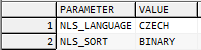
We can change NLS_SORT to BINARY to make the index used again. Alternatively we can set NLS_COMP to BINARY, this will have the same effect.

ALTER SESSION SET NLS_SORT='BINARY';
SELECT PARAMETER, VALUE FROM V$NLS_PARAMETERS
WHERE PARAMETER IN ('NLS_LANGUAGE', 'NLS_SORT');
UPDATE F_JOB_BUDGET_LINE SET ACTUAL_COST=0
WHERE INSTANCE_KEY='JobBudgetLine00000000000004835665';
How to Find Running Queries – SQL Server

SELECT
  CN.session_id  AS SPID,
  ST.text        AS SqlStatementText
FROM
  sys.dm_exec_connections AS CN
CROSS APPLY
  sys.dm_exec_sql_text(CN.most_recent_sql_handle) AS ST
ORDER BY
  CN.session_id

If a BusinessObjects document is refreshing for a long time, you might be interested in what query is currently running (to optimize it). The above code can help to figure out this.

Io exception: Socket read timed out

If you get the following message, check the firewall settings.

ERROR 30-09 09:13:36,485 - YOUR_LOG_CONNECTION - Error disconnecting from database:
Error comitting connection
 Io exception: Socket read timed out

When the transformation/job is started, Kettle opens a connection for logging. The transformation could run for hours, the connection for logging will stay idle all this time and it might be dropped by the firewall. When the transformation finishes execution, stopped by the user or fails with an error and Kettle tries to update the log, it notices that the connection is dropped and displays the error messages.
Continue reading

Influence of Nr of rows in rowset on Merge Join

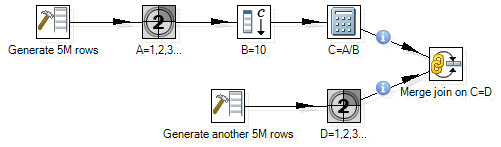
Let’s consider a transformation that merges two flows:

Here are some experiments with different Nr of rows in rowset:

So the speed of the Merge join depends on the parameter Nr of rows in rowset. It should be reasonably high (3000K).

Note that if the parameter is too high, the transformation might fail with exception: java.lang.OutOfMemoryError: Java heap space.

java.lang.OutOfMemoryError: Java heap space

All steps in a transformation runs in parallel. The hops between steps are kind of buffers of rows. The maximum number of rows is controlled with transformation parameter Nr of rows in rowset. However it is important to understand that if this parameter is set to too high value, Kettle might not be able to allocate the required amount of memory and fail with exception java.lang.OutOfMemoryError: Java heap space.

Experiment:

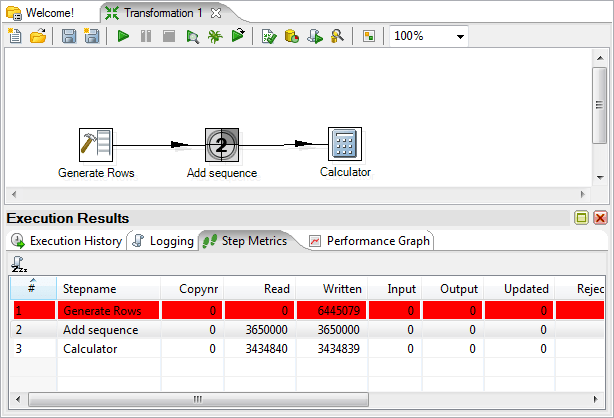
Heap memory for Kettle is restricted with parameter -Xmx to 256m. We will set Nr of rows in rowset to 10M. The following transformation fails after some time when the number of required memory reaches the limit.

The error:

UnexpectedError: java.lang.OutOfMemoryError: Java heap space
java.lang.OutOfMemoryError: Java heap space
	at org.pentaho.di.core.row.RowDataUtil.allocateRowData(RowDataUtil.java:34)
	at org.pentaho.di.core.row.RowMeta.cloneRow(RowMeta.java:311)
	at org.pentaho.di.trans.steps.rowgenerator.RowGenerator.processRow(RowGenerator.java:151)
	at org.pentaho.di.trans.step.BaseStep.runStepThread(BaseStep.java:2889)
	at org.pentaho.di.trans.steps.rowgenerator.RowGenerator.run(RowGenerator.java:215)

Generate rows adds a string field with the 100 bytes string. The other two steps do not do anything significant – step Dummy can be used instead of them.

We can calculate the number of rows in hops calculating the difference between read and write. Hop between Generate Rows and Add sequence holds 6445K-3650K=2795K of rows, hop between Add sequence and Calculator holds 3650K-3435K=215K of rows. So the total is 3010K rows each of which requires at least 100 bytes. The total required memory is more than 301M bytes.

Where universes and documents are stored

BusinessObjects documents and universes are not stored in the CMS database. The CMS database contains only metadata – miscellaneous information about the objects. The files corresponding to the objects are stored in the BO File Repository.

For example, there is a webi document Balance Sheet in the BO. For the document, you can find its ID, CUID, and file name in Central Management Console. (FRS in the file name stands for File Repository Server)

In the example, the file name for the document is:

frs://Input/a_128/035/000/9088/adzbyinunwldinunwldindleqsaoze.wid

The BusinessObjects software is installed in C:\Business Objects, the path to the file repository server is

C:\Business Objects\BusinessObjects Enterprise 12.0\FileStore\

If you join these two, you will find the document on the server.

How to change universe of a webi document using BO RE Java SDK

Web Intelligence documents use one or many universes. Sometimes it is necessary to change universes for a bunch of reports. Changing universe might be very difficult if you need to modify dozens of documents. Luckily it is possible to utilize BusinessObjects Report Engine Java SDK.

There is a number of Webi documents in a folder which use a number of universes. The task is to make a copy of these on the same BOE server.

It is easy to copy documents (in CMC) and universes (using Universe Designer. The complex problem is to change a copied document to use the copied universes.

The manual procedure of changing universe for a document is the following:

  • Open Webi document in Web Intelligence in edit mode.
  • Click Edit query.
  • For each query, change universe in the query properties.
  • Changing universe you have to confirm mapping. If you change a universe to its copy, you do not need to do anything in this mapping. But just confirming it takes few seconds.

The automated procedure for all documents will do the following:

  • Get list of universe IDs that used by the copied documents.
  • Get list of all available universes.
  • Create a mapping of IDs.
  • Map all reports from the original universes to their copies using the mapping.

If you have to modify 5 documents, the writing code might take even more time then do it manually, but anyway coding is more fun then clicking 🙂

If you have to modify 50  documents, think twice before starting manual work.

Java Function

public static boolean changeUniverses(DocumentInstance widoc,
                                      HashMap<String, String> mapping)
{
   boolean failed = false;
   DataProviders dps = widoc.getDataProviders();
   HashSet<DataSource> dataSources = new HashSet<DataSource>();
   for (int i = 0; i < dps.getCount(); ++i) {
      DataProvider dp = (DataProvider) dps.getItem(i);
      dataSources.add(dp.getDataSource());
   }
   for (DataSource ds: dataSources) {
      String universeId = ds.getUniverseID();
      String oldID = universeId;
      String newID = mapping.get(oldID);
      System.out.println(oldID + "->" + newID);
      dps.changeUniverse(oldID, newID, true);
      if (dps.mustFillChangeUniverseMapping()) {
         ChangeUniverseMapping unvMapping = dps.getChangeUniverseMapping();
         ChangeDataSourceMapping[] dsMappings = unvMapping.getDataSourceMappings();
         for (ChangeDataSourceMapping dsMapping : dsMappings) {
            ChangeDataSourceObjectMapping[] objMappings = dsMapping.getAllMappings();
            for (ChangeDataSourceObjectMapping objMapping : objMappings) {
               if (objMapping.getToObject() == null) {
                  failed = true;
               }
            }
         }
         dps.setChangeUniverseMapping();
         if (widoc.getMustFillContexts()) {
            failed = true;
         }
         widoc.applyFormat();
         widoc.refresh();
      }
      if (failed) {
         return false;
      }
   }
   return true;
}

BTW, the universe id is something like:

UnivCUID=ASiM_T4jxmJIj0aKWpbeXro;UnivID=41709;ShortName=Finance;UnivName=Finance

Complete code

https://bukhantsov.org/tools/WidRemapping.zip

Hierarchical (Recursive) Queries in SQL Server

This code sample demonstrates recursive queries in SQL Server.

The query returns paths of Kettle transformations.

with Parent as
(
   select
      ID_DIRECTORY
   ,  ID_DIRECTORY_PARENT
   ,  cast(DIRECTORY_NAME
         as varchar(255)) as DIRECTORY_PATH
   from
      R_DIRECTORY
   where
      ID_DIRECTORY_PARENT = 0
   union all
   select
      TH.ID_DIRECTORY
   ,  TH.ID_DIRECTORY_PARENT
   ,  cast(Parent.DIRECTORY_PATH
         + '/' + DIRECTORY_NAME
         as varchar(255)) as DIRECTORY_PATH
   from
      R_DIRECTORY TH
   inner join
      Parent
   on
      Parent.ID_DIRECTORY = TH.ID_DIRECTORY_PARENT
)
select
   coalesce(dir.DIRECTORY_PATH, '/') DIRECTORY_PATH
,  trans.NAME as TRANSFORMATION_NAME
from
   Parent dir
right join
   R_TRANSFORMATION trans
on
   dir.ID_DIRECTORY = trans.ID_DIRECTORY