How to Restore a Table in Oracle

Simple and easy to use querying tool for Oracle SQL Tools has a little drawback. Trying to remove search string from the filter, you might hit Del. This does not remove the search string but drops the table. Of course it asks confirmation. But if you accidentally dropped the table, the following command might help:

FLASHBACK TABLE table_name TO BEFORE DROP;

The latest version of the tool (1.6) has a nice feature – read-only connection to database.

Fun with Query Builder

I cannot explain this.

SELECT SI_ID, SI_NAME, SI_CUID FROM CI_INFOOBJECTS WHERE SI_ID=23
1/1
Properties
SI_NAME Root Folder
SI_CUID ASHnC0S_Pw5LhKFbZ.iA_j4
SI_ID 23
SELECT SI_ID, SI_NAME, SI_CUID, SI_PARENTID, SI_PARENT_CUID
FROM CI_INFOOBJECTS WHERE SI_PARENTID=23
1/10
Properties
SI_NAME Report Conversion Tool
SI_CUID AY9zJ8BgaF9OucZ2h2slcJM
SI_PARENT_CUID ASHnC0S_Pw5LhKFbZ.iA_j4
SI_PARENTID 0
SI_ID 123

Why the hell SI_PARENTID=0 in the result if SI_PARENTID=23 is in the query restriction?

Hierarchies in Webi

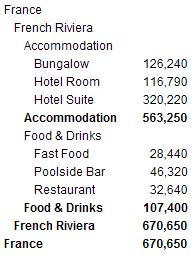
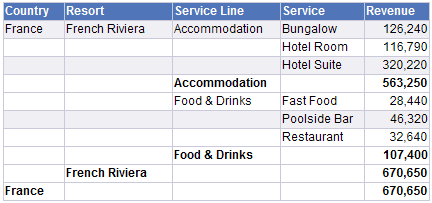
The task is to display a fixed level hierarchy together with totals for each level. This can be done using breaks. The most straightforward implementation might look like this:

If there are many levels and the level names are long, the table will be very wide, with a lot of empty space. It would be better to have more compact layout, for example:

This post describes how to implement such layout. Continue reading

Loading Fact Tables with PyGramETL

The previous post described how to load dimension tables with PyGramETL. This one is about fact tables.

The source CVS file has the following structure:

cust_id;res_date;future_guests;future_revenue
105;2008/04/01 00:00:00.000;2;300
106;2007/04/17 00:00:00.000;4;380
106;2007/04/17 00:00:00.000;4;768
...

Fact Table

CREATE TABLE reservation_fact(
    customer_sk INT,
    reservation_date DATETIME,
    future_guests FLOAT,
    future_revenue FLOAT
)

Kettle

PyGramETL

Continue reading

Loading Dimension Tables with PyGramETL

There is a promising Python framework for ETL – PyGramETL (http://pygrametl.org/)

This post demonstrates an example how to import data from a CSV file and load it into a dimension table using PyGramETL in comparison with the same functionality implemented in a Kettle transformation.

The input file customer.txt has the following structure:

customer_id;first_name;last_name;age;phone_number;address
101;Paul;Brendt;19;(212) 555 2146;10 Jasper Blvd.
102;Robin;McCarthy;29;(214) 555 3075;27 Pasadena Drive
103;Peter;Travis;34;(510) 555 4448;7835 Hartford Drive
...

Dimention Table

MySQL is used for data warehouse. The following code create the dimension table.

CREATE TABLE customer_dim
(
    customer_sk INT,
    customer_id INT,
    valid_from DATETIME,
    valid_to DATETIME,
    version INT,
    phone_number VARCHAR(20),
    first_name VARCHAR(20),
    last_name VARCHAR(20),
    age INT,
    address VARCHAR(50)
)

INSERT customer_dim (customer_sk, version) VALUES (0, 1)

Kettle

Let’s consider how this can be done in Kettle

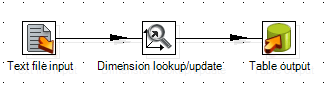
The transformation has two steps:
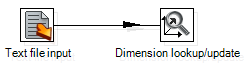
The first step “Text file input” reads the CSV file. The second step “Dimensional lookup/update” generates surrogate key customer_sk as well as technical fields: valid_from, valid_to, version. The update type for first_name and last_name is set to Punch through.

PyGramETL

The same can be done with the following code using PyGramETL

import MySQLdb
import pygrametl
from pygrametl.datasources import CSVSource
from pygrametl.tables import SlowlyChangingDimension

myconn = MySQLdb.connect(user='test', passwd='test', db='test')

connection = pygrametl.ConnectionWrapper(myconn)
connection.setasdefault()

customer_dim = SlowlyChangingDimension(
    name='customer_dim',
    key='customer_sk',
    attributes=['customer_id', 'valid_from', 'valid_to', 'version',
                'first_name', 'last_name', 'age', 'phone_number', 'address'],
    lookupatts=['customer_id'],
    versionatt='version',
    fromatt='valid_from',
    toatt='valid_to',
    type1atts=('first_name', 'last_name'),
    cachesize=-1)

customer_dim.defaultidvalue = 0

def load_customer_dim():
    customer = CSVSource(file('./customer.txt', 'r', 16384), delimiter=';')
    for row in customer:
        printrow
        customer_dim.scdensure(row)
    connection.commit()

def main():
    load_customer_dim()

if __name__ == '__main__':
    main()

On the one hand, it is much easier to get overview of a transformation in Kettle. On the other hand, when the ETL transformation is small, it is much easier to see details in the Python code because you do not have to open each step to see its settings.

Calculated Default Value for a Prompt

It is possible to specify a constant default value for a prompt. But what if the default value need to be calculated.

For example, there should be an optional prompt for the statement date in the report. If the date is not specified by the user, the current date should be used.

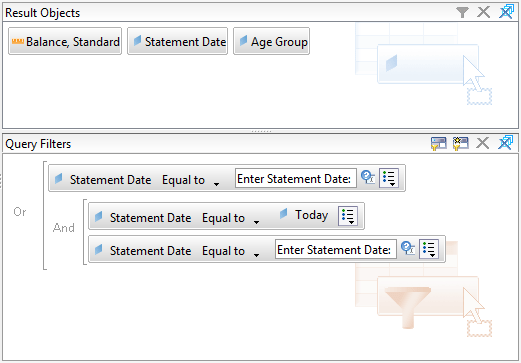
It is possible to implement the logic with the following query filter:

If the date is not specified in the prompt, the optional prompts are ignored and the condition will be reduced to:

Statement Date Equal to Today

If the date is specified, the condition will be equivalent to:

Statement Date Equal to Prompt "Enter Statement Date"

because

A or (A and B) <=> (A and True) or (A and B) <=> A and (True or B) <=> A

Removing multiple hyperlinks in Excel

There are some techniques on the web on how to remove all hyperlinks from Excel document. These include removing using Paste special and a macro. Sometimes it is difficult to use Paste special because of merged cells, and macro sounds too frightening and also it may spoil your formatting.

Another technique is to use Find and Replace.

  • Hit Ctrl+H
  • Click Options
  • For the field Find what, click the arrow on the button Format
  • Select option Choose Format From Cell
  • Pick the format of a cell with hyperlink
  • In the field Replace with, choose the format for a number without hyperlink
  • If you want to remove hyperlinks in the whole workbook, change Within from Sheet to Workbook.
  • Click Replace All

Links

http://www.google.com/search?q=Removing+multiple+hyperlinks+in+Excel