bukhantsov.org

my technical notes

Skip to content

How to disable version check in Upgrade Management Tool

To avoid error

“Version check failed. The source system or source BIAR file must be of an older version. The destination system system must be of the current version. (UMT 20012)”

you can use (at own risk) the option

-internal_use_only_noversioncheck
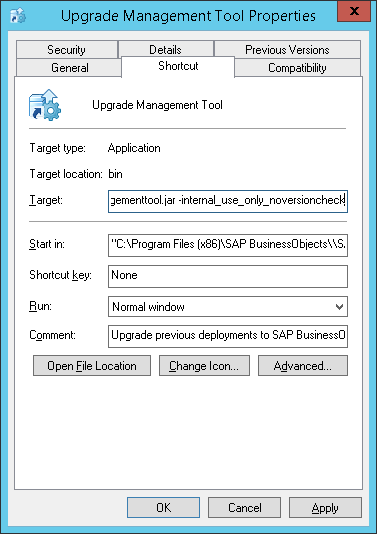
internal_use_only_noversioncheck

Share this:

  • Share on X (Opens in new window) X
  • Share on Facebook (Opens in new window) Facebook
Like Loading...

Related

This entry was posted in Administration on May 18, 2016 by dmytro.

Post navigation

← Web Intelligence RESTful Web Services SDK with Java BusinessObjects BI Tomcat logs →
  • Business Objects
    • Administration
    • SDK
    • Tools
    • Universe Designer
    • Web Intelligence
    • Xcelsius
  • Command Line
  • Data Warehousing
    • Design
    • Kettle
    • Methodology
  • Databases
    • Oracle
    • SQL Server
  • Maconomy
  • OLAP
  • Other
  • Programming
    • C#
    • Flex
    • Java
    • Javascript
    • Python
  • Uncategorized
Website Built with WordPress.com.
  • Subscribe Subscribed
    • bukhantsov.org
    • Already have a WordPress.com account? Log in now.
    • bukhantsov.org
    • Subscribe Subscribed
    • Sign up
    • Log in
    • Copy shortlink
    • Report this content
    • View post in Reader
    • Manage subscriptions
    • Collapse this bar
 

Loading Comments...
 

    %d