Monthly Archives: October 2011

Io exception: Socket read timed out

If you get the following message, check the firewall settings.

ERROR 30-09 09:13:36,485 - YOUR_LOG_CONNECTION - Error disconnecting from database:
Error comitting connection
 Io exception: Socket read timed out

When the transformation/job is started, Kettle opens a connection for logging. The transformation could run for hours, the connection for logging will stay idle all this time and it might be dropped by the firewall. When the transformation finishes execution, stopped by the user or fails with an error and Kettle tries to update the log, it notices that the connection is dropped and displays the error messages.
Continue reading
Influence of Nr of rows in rowset on Merge Join

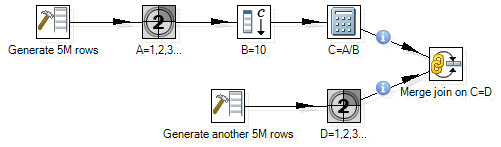
Let’s consider a transformation that merges two flows:

Here are some experiments with different Nr of rows in rowset:

So the speed of the Merge join depends on the parameter Nr of rows in rowset. It should be reasonably high (3000K).

Note that if the parameter is too high, the transformation might fail with exception: java.lang.OutOfMemoryError: Java heap space.

java.lang.OutOfMemoryError: Java heap space

All steps in a transformation runs in parallel. The hops between steps are kind of buffers of rows. The maximum number of rows is controlled with transformation parameter Nr of rows in rowset. However it is important to understand that if this parameter is set to too high value, Kettle might not be able to allocate the required amount of memory and fail with exception java.lang.OutOfMemoryError: Java heap space.

Experiment:

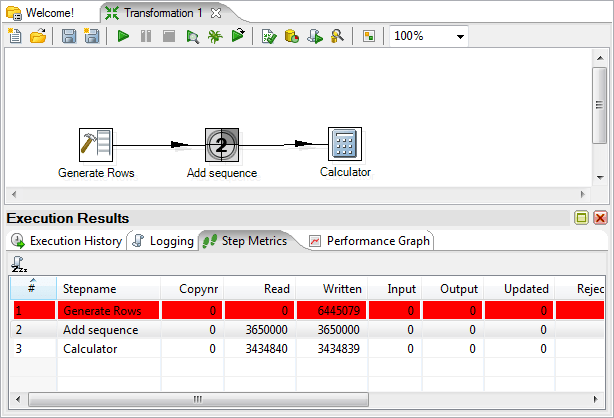
Heap memory for Kettle is restricted with parameter -Xmx to 256m. We will set Nr of rows in rowset to 10M. The following transformation fails after some time when the number of required memory reaches the limit.

The error:

UnexpectedError: java.lang.OutOfMemoryError: Java heap space
java.lang.OutOfMemoryError: Java heap space
	at org.pentaho.di.core.row.RowDataUtil.allocateRowData(RowDataUtil.java:34)
	at org.pentaho.di.core.row.RowMeta.cloneRow(RowMeta.java:311)
	at org.pentaho.di.trans.steps.rowgenerator.RowGenerator.processRow(RowGenerator.java:151)
	at org.pentaho.di.trans.step.BaseStep.runStepThread(BaseStep.java:2889)
	at org.pentaho.di.trans.steps.rowgenerator.RowGenerator.run(RowGenerator.java:215)

Generate rows adds a string field with the 100 bytes string. The other two steps do not do anything significant – step Dummy can be used instead of them.

We can calculate the number of rows in hops calculating the difference between read and write. Hop between Generate Rows and Add sequence holds 6445K-3650K=2795K of rows, hop between Add sequence and Calculator holds 3650K-3435K=215K of rows. So the total is 3010K rows each of which requires at least 100 bytes. The total required memory is more than 301M bytes.

Where universes and documents are stored

BusinessObjects documents and universes are not stored in the CMS database. The CMS database contains only metadata – miscellaneous information about the objects. The files corresponding to the objects are stored in the BO File Repository.

For example, there is a webi document Balance Sheet in the BO. For the document, you can find its ID, CUID, and file name in Central Management Console. (FRS in the file name stands for File Repository Server)

In the example, the file name for the document is:

frs://Input/a_128/035/000/9088/adzbyinunwldinunwldindleqsaoze.wid

The BusinessObjects software is installed in C:\Business Objects, the path to the file repository server is

C:\Business Objects\BusinessObjects Enterprise 12.0\FileStore\

If you join these two, you will find the document on the server.